

TL;DR
Relying purely on text prompts to generate video is a gamble most creators lose. The vidu q1 changes the equation by anchoring your motion generation to specific reference images, giving you absolute control over character consistency and scene lighting.
Anyone who has wasted hours trying to force an AI model to keep a face identical across multiple shots understands the pain of early generative tools. You get a brilliant wide shot, but the close-up looks like a completely different person. This specific frustration is exactly what the reference-to-video workflow eliminates.
By allowing you to upload up to seven distinct source photos, you essentially train the model on your protagonist's exact features before rendering a single frame. You act as the director—providing the visual ground truth—while the engine computes the physics and movement. It shifts the entire process from typing a wish to actually composing a cinematic sequence.
Why the Vidu Q1 Reference-to-Video Feature is a Total Lifesaver
If you've spent any time in the AI video space, you know the frustration of "prompt-and-pray." You type a detailed description, hit generate, and get something that looks nothing like what you imagined. But here is the thing: the vidu q1 changes that entire dynamic.
Instead of relying solely on text, the vidu q1 allows you to anchor your creativity with actual images. It’s not just about making things move; it’s about making the right things move. This level of control was unheard of just a year ago.
I’ve tested dozens of models, and the vidu q1 stands out because it doesn't just hallucinate a scene. It respects your source material. Whether you are building a brand or just making a weird meme, this tool respects your visual intent.
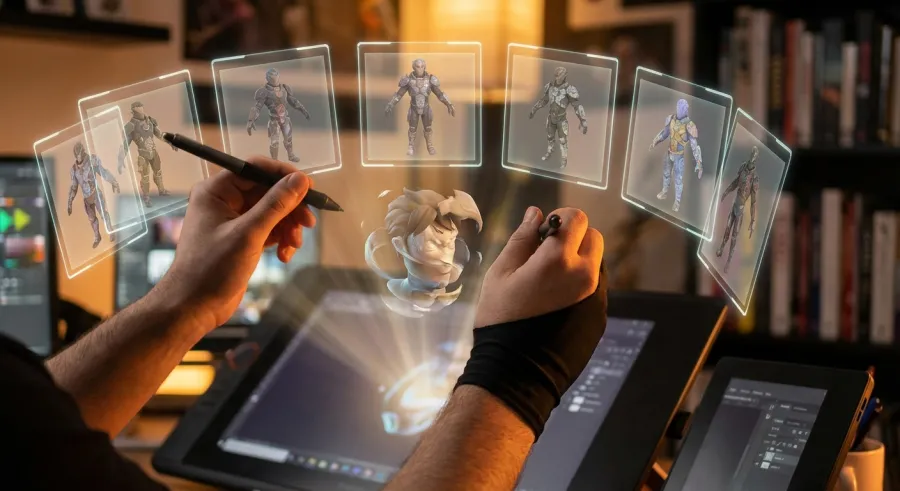
And let's be real: most AI generators feel like a black box. You put something in, and you hope for the best. With vidu q1, you are the director. You provide the cast, the props, and the vibe through reference images.
The vidu q1 isn't just a toy for enthusiasts; it’s a functional piece of tech that bridges the gap between static art and cinematic storytelling.
Mastering the Character Consistency in Vidu Q1
Consistency is the holy grail of AI video. We’ve all seen those videos where a character’s hair changes color every three seconds. The vidu q1 tackles this head-on. By uploading up to seven reference images, you "train" the model on who your character is.
This means your protagonist looks the same in a close-up as they do in a wide shot. When using vidu q1, I recommend uploading images from different angles—front, profile, and three-quarters. This gives the AI the data it needs to build a 3D-aware movement profile.
But there’s a catch: the quality of your output depends heavily on the quality of those seven images. If your references are blurry, your vidu q1 output will be too. I always tell my colleagues to use high-res, clean shots to get the best results.
Vidu Q1 as a Creative Partner
When you start a project in vidu q1, think of it as a collaboration. The tool handles the physics and the lighting, but you handle the soul. It’s surprisingly good at merging disparate styles into a cohesive video sequence.
I’ve found that the vidu q1 handles textures particularly well. If you upload a reference of a silk dress, the AI understands how that fabric should catch the light as it moves. That is the kind of detail that makes or breaks an AI video.
Getting Started with Your Vidu Q1 Invitation Code
Accessing these advanced tools often feels like trying to get into an exclusive club. Luckily, the barrier to entry for vidu q1 isn't as high as you might think. You just need to know where to look and what code to use.
The current golden ticket is the invitation code VIDUR2V. Entering this opens up the reference-to-video features that everyone is talking about. Without it, you are basically stuck in the "standard" mode, which is fine, but it’s not where the magic happens.
Setting up your account is straightforward, but don't rush the process. You want to make sure your environment is ready to handle the rendering. The vidu q1 is powerful, but it still requires a decent bit of "hand-holding" through clear, descriptive prompts.
So, once you are in, what’s the first thing you should do? Don't just jump into complex scenes. Start by testing how vidu q1 handles a single reference image. See how it interprets a simple movement before you try to recreate a Hollywood action sequence.
Step-by-Step Vidu Q1 Setup and First Prompts
- Navigate to the official portal and sign up for an account.
- Locate the invitation code field and enter VIDUR2V to unlock the vidu q1 advanced suite.
- Upload your primary character reference image to the first slot.
- Add background or prop references to the remaining six slots to ground the vidu q1 scene.
- Write a prompt that describes the action, not just the subject.
Here’s a tip: focus your prompt on verbs. Words like "striding," "shimmering," or "cascading" give the vidu q1 a clear direction for motion. If you just describe the character again, you are wasting valuable prompt space.
The Vidu Q1 User Interface
The interface is surprisingly clean for such a complex tool. You won't find a million confusing sliders. Instead, vidu q1 focuses on the relationship between your images and your text. It’s an intuitive layout that favors creators over coders.
But don't let the simplicity fool you. Beneath the surface, the vidu q1 is crunching massive amounts of data to ensure that the reference-to-video transition is smooth. It’s a delicate balance of AI power and user-friendly design.

Core Vidu Q1 Capabilities You Actually Need to Know
The vidu q1 isn't just a one-trick pony. While reference-to-video is the headline feature, its ability to maintain style across different dimensions is what keeps professionals coming back. You can jump timelines and settings while keeping your identity intact.
Imagine uploading a photo of yourself and a reference image of a cyberpunk city. The vidu q1 can place you in that scene with startling accuracy. It’s not a crude "copy-paste" job; the AI relights your photo to match the neon glow of the city.
This makes vidu q1 incredibly useful for "Virtual Drug-Like Experiences" (VDLE) and other immersive content. It allows for a level of individualized storytelling that was previously impossible without a massive VFX budget and months of work.
| Feature | What it does in vidu q1 | Practical Benefit |
|---|---|---|
| Ref-to-Video | Merges 7 images + text | Total visual control |
| Consistency | Locked character features | Perfect for episodic content |
| Style Transfer | Adopts scene lighting/vibe | High-end cinematic look |
Transforming Static Photos into Vidu Q1 Motion
One of my favorite ways to use vidu q1 is to breathe life into old family photos or static digital art. You take a high-quality scan, upload it to vidu q1, and prompt for subtle movement like "a gentle breeze through the hair" or "a soft smile."
The AI understands the anatomy behind the face. It doesn't just warp the pixels; it moves the underlying structure. This is where the vidu q1 expertise really shines. It feels like the model understands the weight and physics of the world it’s creating.
And if you are looking to scale this, you might want to compare the vidu q1 against its successor to see which version handles your specific art style better. Sometimes the original is exactly what you need.
Promotional Video Magic with Vidu Q1
For small businesses, the vidu q1 is a budget-saver. You can take product photos and turn them into 5-second social media ads in minutes. Upload your product, upload a lifestyle scene reference, and let the vidu q1 do the heavy lifting.
The result is a professional-looking clip that would usually cost thousands in studio fees. By using vidu q1, you are cutting down production time significantly. It’s about efficiency without sacrificing the "premium" feel your customers expect.
I’ve seen some incredible "unboxing" videos created entirely within vidu q1. The way the AI handles the interaction between hands and objects is getting better with every update. It’s a massive win for the e-commerce sector.
Real-World Vidu Q1 Use Cases: From Memes to Marketing
We can't talk about vidu q1 without mentioning the memes. The community has used this tool to create some of the most viral AI content on the internet. Because the vidu q1 is so good at character consistency, it's perfect for putting famous faces in ridiculous situations.
But beyond the laughs, there is serious work being done. Independent filmmakers are using vidu q1 to storyboard their films with actual motion. Instead of static drawings, they show the crew exactly how they want a scene to feel, lighting and all.
It’s also becoming a staple in the music industry. Emerging artists use vidu q1 to generate visualizers for their tracks. It’s a way to have high-quality visuals on a DIY budget. You just feed the vidu q1 the cover art and a few reference moods.
- Animated Storyboarding for Indie Films
- High-Engagement Social Media Memes
- E-commerce Product Showcases
- Music Video Visualizers and Loops
- Personalized AI Avatar Content
High-End Marketing Workflows Using Vidu Q1
In a professional agency setting, the vidu q1 acts as a "speed-to-concept" tool. You can pitch five different visual directions to a client by lunchtime. You aren't just telling them what you'll make; you're showing them a vidu q1 draft.
The key here is the API integration. If you are running a high-volume operation, you don't want to be clicking "generate" all day. You want to automate the vidu q1 workflow. This is where professional platforms come into play.
Using a unified API allows you to leverage vidu q1 along with other pro models to build a custom pipeline. You might use one AI for the script, another for the voiceover, and the vidu q1 for the final visual assembly.
Educational Content and Vidu Q1
Educators are starting to catch on, too. Creating engaging videos for complex concepts is hard. But with vidu q1, you can personify abstract ideas. Want a talking atom? Upload a reference of a sleek, futuristic sphere and use vidu q1 to make it explain physics.
The visual nature of the vidu q1 makes information much more digestible. We are moving toward a world where every textbook has a companion video series generated by AI. And the vidu q1 is at the forefront of that movement.
Honest Vidu Q1 Limitations: Why Newer Isn't Always Better
I’m going to go against the grain here: newer isn't always better. While Vidu Q2 has been released, many practitioners (myself included) still swear by the vidu q1 for certain tasks. Why? Because the vidu q1 often feels more grounded in reality.
Some of the newer versions can get a bit "cartoonish" or overly smoothed out. They lose that raw, cinematic grain that the vidu q1 preserves so well. If you are going for a realistic look, the vidu q1 is still your best bet.
However, the vidu q1 isn't perfect. It can struggle with complex hand movements—just like every other AI model on the market. If your scene requires a character to tie their shoes or play the piano, the vidu q1 might glitch. It’s getting better, but we aren't at 100% perfection yet.
"Don't throw away your vidu q1 workflow just because a newer model dropped. The Q1 version's handling of textures remains superior for photorealistic projects."
Comparing Vidu Q1 to Vidu Q2 and Competitors
When you look at the landscape, tools like Kling 2.1 and Hedra 3 are also making waves. But they have different "personalities." Kling is fantastic for long-form motion, while the vidu q1 excels at detailed, reference-based short clips.
If your goal is to explore all available AI models including the various Vidu iterations, you'll notice that the vidu q1 has a specific "weight" to its movement. It doesn't feel floaty. The gravity in a vidu q1 video feels right.
One major gripe people have with vidu q1 is the rendering time. It’s not instant. You have to wait. But in my experience, a 2-minute wait for a high-quality vidu q1 clip is much better than a 10-second wait for a clip that you can't actually use.
Navigating the Uncanny Valley with Vidu Q1
The "uncanny valley" is that creepy feeling you get when something looks almost human, but not quite. The vidu q1 does a better job than most at avoiding this. By using real photos as references, the AI has a "ground truth" to stick to.
To avoid the creep factor in vidu q1, avoid over-prompting for facial expressions. Let the AI handle the natural micro-movements. If you tell the vidu q1 to make someone "laugh hysterically," it might look forced. Go for "a subtle, knowing smile" instead.
Final Thoughts: Is Vidu Q1 Still the Best AI Video Tool?
So, where does that leave us? The vidu q1 is a powerhouse for anyone who values control over chaos. It’s the tool for the artist who has a specific vision and won't settle for "close enough." Its reference-to-video capabilities are its strongest selling point.
While the industry moves at lightning speed, the vidu q1 has maintained its relevance by being reliable. It’s a workhorse. It’s the model you turn to when the client is breathing down your neck and you need a shot that looks exactly like the reference photo.
If you haven't tried it yet, grab the invitation code and give it a spin. Whether you are using the web interface or an API to scale your production, the vidu q1 belongs in your creative toolkit. It’s not just about the AI; it’s about what you can do with it.
And if you are worried about the cost of all these API calls, you can always manage your API billing through a central hub to keep things efficient. High-quality AI doesn't have to break the bank if you're smart about it.
Scaling Your Vidu Q1 Workflow with Modern Tools
As you grow, you'll realize that the vidu q1 is just one part of a larger ecosystem. You'll want to pipe your outputs into editing software, add AI-generated sound, and maybe even upscaled resolution. The vidu q1 is the foundation, but the house you build on it can be massive.
For those looking to integrate this into a professional software product, I highly recommend you read the full API documentation to see how to trigger vidu q1 generations programmatically. This is how you move from being a hobbyist to a serious AI developer.
Using a unified API platform like GPT Proto can save you up to 70% on costs while giving you access to vidu q1 alongside other heavy hitters like Midjourney and Claude. It’s the smartest way to play the AI game right now. You get the power of vidu q1 without the headache of managing ten different subscriptions.
At the end of the day, the vidu q1 is about potential. It takes your static ideas and gives them a pulse. It’s a glimpse into the future of cinema—a future where the only limit is your imagination and your ability to pick the right reference images.
Written by: GPT Proto
"Unlock the world's leading AI models with GPT Proto's unified API platform."


