
The New Standard in AI Video
ByteDance has officially redefined the landscape of generative media with the release of Seedance 2.0. Moving far beyond the capabilities of its predecessors, this model introduces cinematic 15-second clips, native 2K resolution, and complex multimodal inputs that have creators and developers queuing for access. Whether you are a filmmaker looking to storyboard complex fight scenes or a developer seeking robust Seedance 2.0 API solutions via GPT Proto, this guide breaks down everything you need to know about the industry's new heavyweight.
Introduction: The "iPhone Moment" for AI Video?
When ByteDance released Seedance 2.0 in early February 2026, the reaction was immediate and visceral. Internet queues stretched into the thousands, and users reportedly stayed awake until 4 a.m. just to test the generation limits. But the hype wasn't just coming from tech enthusiasts; acclaimed Chinese director Jia Zhangke—a filmmaker renowned for his gritty, grounded realism—publicly praised the model's capabilities, signaling a shift in how traditional cinema views generative AI.
Seedance 2.0 isn't just an upgrade; it is a complete reimagining of how AI interprets motion, physics, and narrative continuity. For content creators, it offers a way to produce Vlogs and short dramas without a camera. For developers, the potential integration of the Seedance 2.0 API opens doors to automated advertising and dynamic content apps.
In this comprehensive guide, we will dismantle the hype to look at the raw capabilities, provide you with copy-paste prompts that actually work, and explain how to access this technology programmatically.
The Evolution of Seedance: From 1.0 to 2.0
To understand the power of Seedance 2.0, we must look at the trajectory of ByteDance's development. This is not merely a version number increment; it represents a fundamental shift in the model's architecture regarding multimodal understanding.
Seedance 1.0: The Foundation
The initial release, Seedance 1.0, focused on solving the "jitter" problem. It established stable motion for short clips (5-8 seconds) but lacked sound and struggled with complex object permanence. It was a proof of concept that proved AI could hallucinate consistent video, even if it couldn't tell a story.
Seedance 1.5 Pro: The Audio-Visual Bridge
The 1.5 Pro update was the first to introduce native audio-visual joint generation. This meant the model didn't just add sound later; it generated the video and audio simultaneously in the latent space. This allowed for lip-syncing and Foley effects (like footsteps or glass breaking) that perfectly matched the visual action. However, it was still limited by resolution and clip duration.
Seedance 2.0: The Multimodal Powerhouse
Seedance 2.0 breaks the previous ceilings. It supports a massive context window allowing for up to 12 simultaneous input files (images, video, and audio combined). It extends generation to 15 seconds of native 2K resolution and features a retrained physics engine that understands gravity, fluid dynamics, and cloth simulation far better than any competitor currently on the market.
Technical Comparison: Seedance Variants
For developers and power users, here is the breakdown of specifications:
| Feature | Seedance 1.0 | Seedance 1.5 Pro | Seedance 2.0 |
| Max clip length | ~8 seconds | ~10 seconds | 15 seconds |
| Native audio | No | Yes | Yes, High Fidelity |
| Multimodal input | Text + image | Text + image + audio | Text + image + video + audio (12 files) |
| Character consistency | Good | Better | Production Ready |
| Physics realism | Basic | Moderate | Advanced Physics Engine |
| Resolution | 720p–1080p | 1080p | Native 2K |
An Honest Review: Strengths and Weaknesses
Before integrating Seedance 2.0 into your workflow, you need to know where it shines and where it breaks. This data is compiled from hundreds of hours of beta testing.
Where It Dominates
- Complex Multimodal Fusion: The ability to accept 9 images, 3 videos, and 3 audio files simultaneously is unmatched. This allows users to dictate character look, camera movement, and soundscape in a single prompt.
- Physics and Fluidity: Water, hair, and fabric move with startling realism. The "uncanny valley" effect of floating limbs is largely gone.
- Editing Capabilities: Unlike competitors that only generate new footage, Seedance 2.0 allows for video-to-video editing, enabling users to swap clothes or change backgrounds on existing footage.
Current Limitations
- Infrastructure Load: The popularity of Seedance 2.0 has led to massive queues. Developers relying on the API need stable providers like GPT Proto to avoid timeouts.
- Identity Restrictions: Real human face uploads are heavily restricted on web platforms due to safety protocols, which can be a hurdle for deepfake-style content (though this is a safety feature, not a bug).
- Fine-Detail Flickering: In high-motion scenes involving complex textures (like chainmail or dense foliage), slight temporal flickering can still occur.
10 Actionable Use Cases with Copy-Paste Prompts
The true value of Seedance 2.0 lies in its application. Below are ten specific workflows used by early adopters, complete with the prompts that generated them.
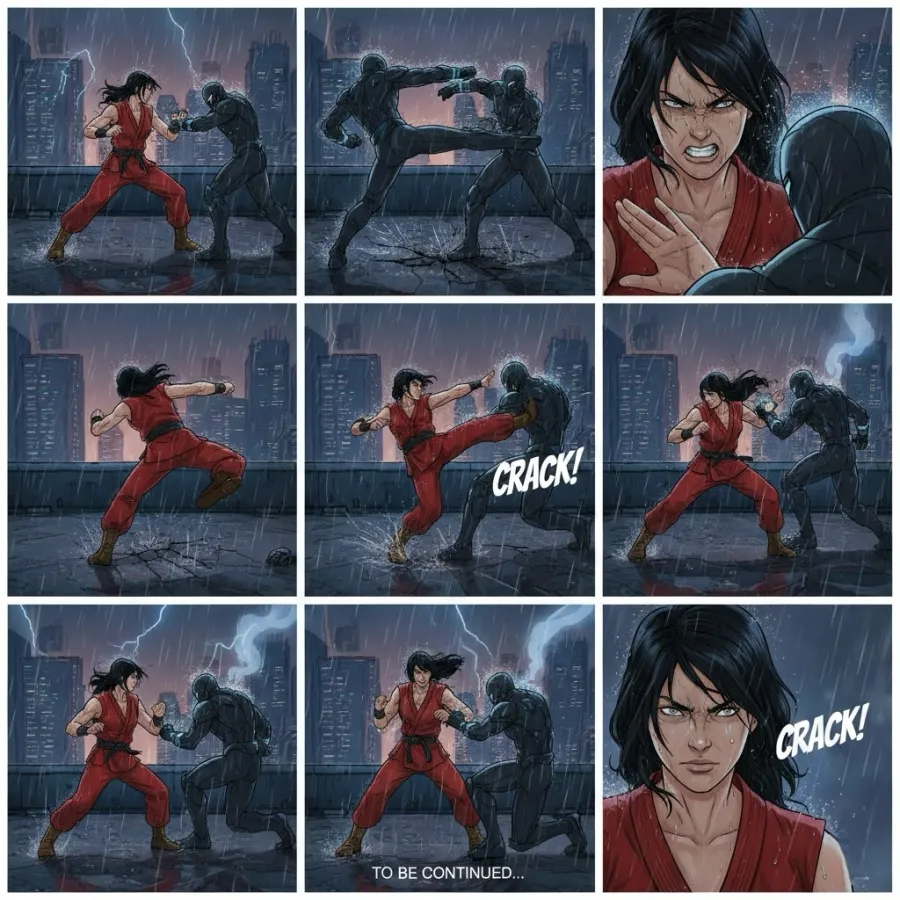
1. The "Nine-Panel" Storyboard Workflow
This is the most viral workflow for Seedance 2.0. By feeding the model a single image containing nine distinct storyboard panels, you can force the AI to generate a sequence of rapid, coherent cuts that follow cinematic logic.
The Strategy: Use an image generator (like Midjourney or Seedream) to create a grid of 9 action shots. Upload this grid to Seedance.
The Prompt:
"Based on this nine-panel storyboard, generate a smooth and continuous fight sequence between a giant anthropomorphic cat and a red giant. Show the fight through fluid, connected action. Maintain the exact framing of each panel in sequence."
2. 3D Motion Transfer
Animators can use low-poly 3D block-outs or basic motion capture data as a video input. Seedance 2.0 will "skin" the video with high-fidelity graphics while retaining the exact movement of the reference.
The Prompt:
"A battle between [Image 1] and [Image 2]. They fight in a neon-lit cyberpunk forest. Use the movements from [Video 1] strictly. Use the camera motion from [Video 1]. Render in 8k, photorealistic style."
3. Emotional Micro-Dramas
The model's understanding of emotional cues makes it perfect for the booming "short drama" market. It captures subtle facial micro-expressions.
The Prompt:
"Style: Korean Drama, cinematic lighting, rainy night.
Action: Shot 1: Man in trench coat grabs woman's wrist. Shot 2: Close up on woman's eyes, pupils shaking, tears mixing with rain. Shot 3: Man pulls out a ring. Emotional intensity: High."
4. Cross-Universe Battles
Fan fiction comes alive by pitting characters from different IPs against each other. The key is describing the characters visually rather than using copyrighted names to avoid filters.
The Prompt:
"15-second clip of two giant monsters [Image 1] and [Image 2] fighting in Tokyo. Wide angle shots to emphasize scale. Dust clouds, crumbling buildings, debris flying. Seedance 2.0 style realistic rendering."
5. Comic-to-Animation
Transform static four-panel webcomics into animated shorts. The model respects the pacing of the comic panels.
The Prompt:
"Animate this four-panel comic. Maintain the comedic timing. Panel 1: Boss stares at employee. Panel 2: Employee sweats nervously. Panel 3: Employee makes an excuse. Panel 4: Twist ending. Style: 2D anime cel-shaded."
6. Commercial Quality Product Reveals
Small businesses can generate high-end product B-roll without a studio. The lighting and texture rendering on objects like glass and metal are exceptional.
The Prompt:
"Cinematic slow-motion product shot of a luxury perfume bottle [Image 1]. Golden hour lighting, soft bokeh background. Water splash effect hitting the bottle. 4k resolution, advertising standard."
7. Novel Visualization
Authors can upload screenshots of their text. Seedance 2.0 reads the text descriptions and generates the scene described in the prose.
The Prompt:
"Create visuals that match the text in these images exactly. Capture the gloomy atmosphere described in paragraph 2. No subtitles."
8. Travel Vlog Enhancement
Upload a dump of static travel photos. The AI identifies the location (e.g., Kyoto, Paris) and animates them into a vlog with transitions and ambient noise.
The Prompt:
"Generate a dynamic travel vlog from these photos. Add smooth transitions, ambient city sounds, and lo-fi background music. Keep the mood relaxed and nostalgic."
9. Script-to-Video Direct
Agencies can upload a production table (script formatting) directly. The AI parses the "Shot," "Action," and "Dialogue" columns to generate the video.
The Prompt:
"Generate a video based on this script table. Follow the shot sizes (Wide, Medium, Close-up) strictly. Adhere to the dialogue timing."
10. Text Reveal Animations
Create After Effects-style kinetic typography and logo reveals instantly.
The Prompt:
"Cinematic logo reveal for a tech company. Neon blue lines trace the logo outline [Image 1]. The background is deep black. Energetic, futuristic feel."
Accessing the Seedance 2.0 API
While the consumer-facing apps like Dreamina and CapCut are excellent for casual use, developers building scalable applications face challenges with direct access, including region locking and rate limits.
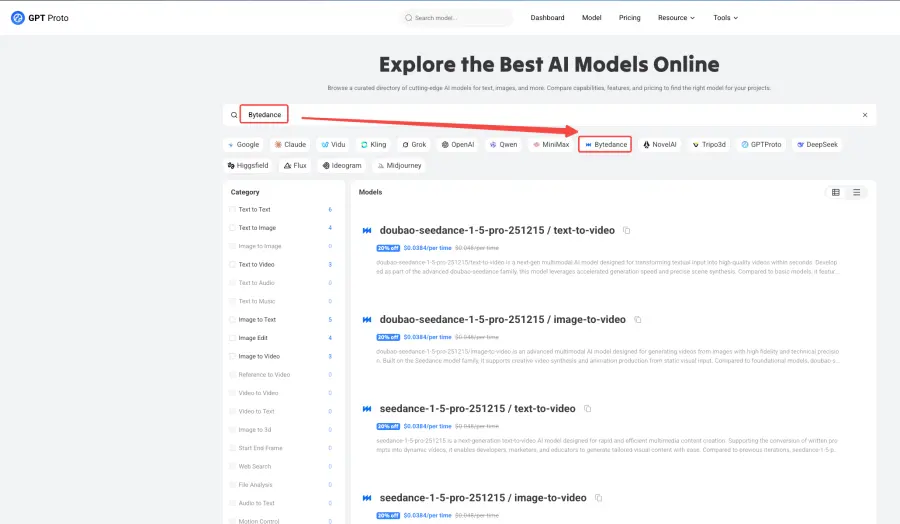
This is where GPT Proto bridges the gap. By aggregating access to ByteDance's models, GPT Proto provides a unified API endpoint that allows for seamless integration of Seedance 2.0 capabilities into your own software.
Why Use GPT Proto for Seedance?
- Unified Integration: Switch between Seedance 1.5, 2.0, Sora, and Veo with a single parameter change. No need to rewrite code for different providers.
- Cost Efficiency: GPT Proto offers pricing that is often 30-50% lower than direct provider rates due to bulk aggregation.
- High Availability: With automatic failover systems, if one access route to ByteDance is congested, GPT Proto reroutes to ensure your request completes.
Developers can begin testing immediately with the current Seedance 1.5 Pro endpoints and seamlessly upgrade to the Seedance 2.0 API as soon as the integration is finalized. Check the model catalog for documentation.
Frequently Asked Questions
Is Seedance 2.0 free?
Not entirely. While apps like Xiaoyunque offer free daily credits, serious usage requires a paid subscription on Dreamina (approx. $9.60/month). However, API usage via GPT Proto allows for pay-as-you-go flexibility, which is often cheaper for developers than a flat monthly fee.
How does it compare to Sora?
Sora excels at hyper-realistic, long-form coherence. However, Seedance 2.0 currently holds the edge in controllability thanks to its multimodal input system. If you need a video to match a specific reference image exactly, Seedance is the superior choice.
Can I use it for commercial work?
Yes. The output from Seedance 2.0 is generally cleared for commercial use, provided you have the rights to the input images you provide. Many agencies are already using it for pitch decks and social media ads.
Conclusion
Seedance 2.0 is more than just a viral trend; it is a robust production tool that lowers the barrier to entry for high-quality video creation. With features like physics-based rendering, multimodal inputs, and 2K resolution, it is ready for professional workflows.
For those looking to build the next generation of AI video apps, accessing the Seedance 2.0 API through GPT Proto offers the reliability and scalability needed to succeed. The tools are here—the only limit now is your imagination.

