
The digital content landscape is witnessing a massive disruption. Video creators, marketers, and developers are constantly seeking faster, more intuitive ways to produce stunning visuals. Enter Kling O1. This groundbreaking AI model merges video generation and complex editing into a single, seamless workflow. You no longer need to switch between clunky software suites. Kling O1 understands natural language commands, allowing you to manipulate video elements simply by typing your vision.
Whether you want to swap a character's outfit, extract a green screen, or transfer complex dance choreography, Kling O1 handles it all. By bridging the gap between raw imagination and professional output, Kling O1 is transforming the creative industry. Let's dive deep into its core features, real-world applications, and why it is the ultimate tool for modern creators.
The video generation landscape experienced a seismic shift on December 1, 2025. Chinese AI powerhouse Kuaishou unveiled Kling O1, an unprecedented video creation tool. Industry insiders quickly dubbed Kling O1 the "video world's Nano Banana." This comparison captures the sheer magnitude of the technological leap.
Drawing parallels to Google's Nano Banana Pro is not merely clever marketing. Nano Banana Pro completely transformed image generation through highly advanced reasoning capabilities. Kling O1 achieves a similar paradigm shift in video production. It successfully unifies raw generation and intricate editing into a single, highly intelligent ecosystem. Kling O1 intuitively understands complex natural language commands, eliminating the steep learning curve traditionally associated with professional video editing.

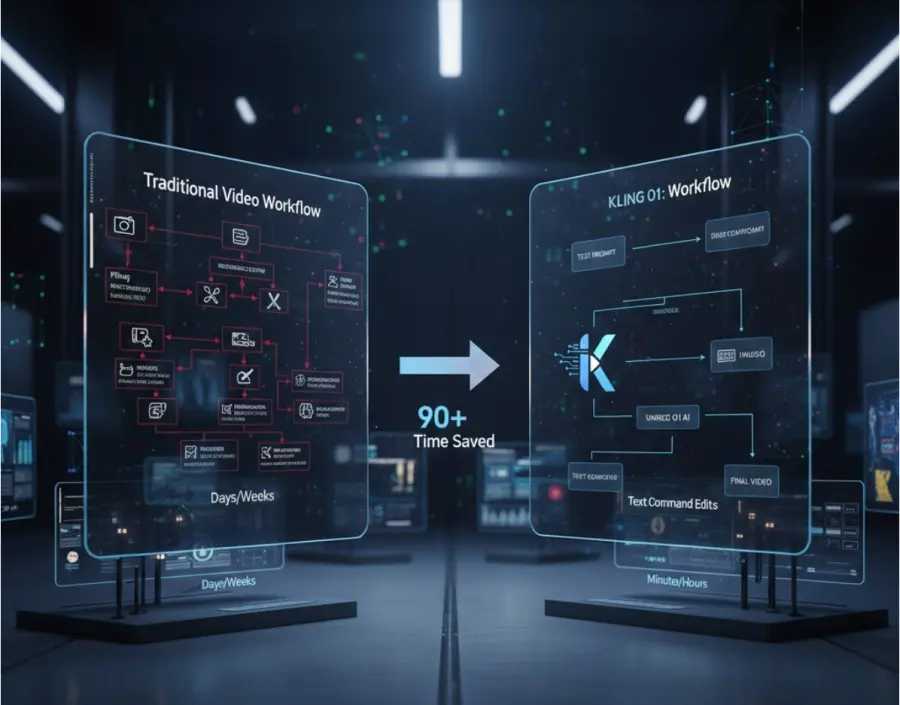
Modern digital creators often find themselves drowning in deeply fragmented workflows. They jump frantically between separate platforms for generation, traditional editing, motion tracking, and style transfer. Kling O1 directly addresses this massive pain point. You can now manipulate video content as easily as describing your creative vision in everyday language. Kling O1 executes these commands with astonishing precision.
Understanding the Mechanics of Kling O1
Kling O1 represents a fundamental reimagining of how artificial intelligence processes moving images. The official designation, "Omni One," perfectly encapsulates its purpose. The "O" signifies "Omni," derived from the Latin root for "all" or "everything." This mirrors the naming conventions of top-tier models like GPT-4o, signaling a true multimodal foundation.
Built upon a cutting-edge Multimodal Visual Language (MVL) architecture, Kling O1 operates differently than its predecessors. Early text-to-video systems simply tried to predict the next pixel based on text prompts. Kling O1 genuinely understands the spatial and temporal reality of the video frame.
To appreciate the power of Kling O1, we must look at the rapid evolution of Kuaishou's AI research. The progression has been nothing short of breathtaking.
The Evolution Leading to Kling O1
The journey to Kling O1 was paved with significant milestones. In June 2024, the team launched Kling 1.0. This early version established robust baseline capabilities for text-to-video generation. It proved that Kuaishou could compete with major Western AI laboratories. However, generation was isolated from editing.
By December 2025, the release of Kling O1 shattered existing limitations. It introduced a completely unified workflow for both generating new footage and editing existing media. Developers and creators can currently access Kling O1 directly at https://app.klingai.com/. The platform offers free credits to encourage extensive testing and exploration of the Kling O1 model.
The engineering team designed Kling O1 as an integrated cognitive system. It reads, comprehends, and manipulates moving elements entirely through conversational instructions. Before Kling O1, no AI video model successfully merged reference-based generation, structural editing, style transformation, and temporal control into one native environment. Kling O1 does exactly that.
Core Features Powering Kling O1
The technical capabilities of Kling O1 extend far beyond simple text prompting. Its architecture supports highly complex, multi-layered creative demands. The system operates seamlessly to preserve visual fidelity while executing dramatic transformations.
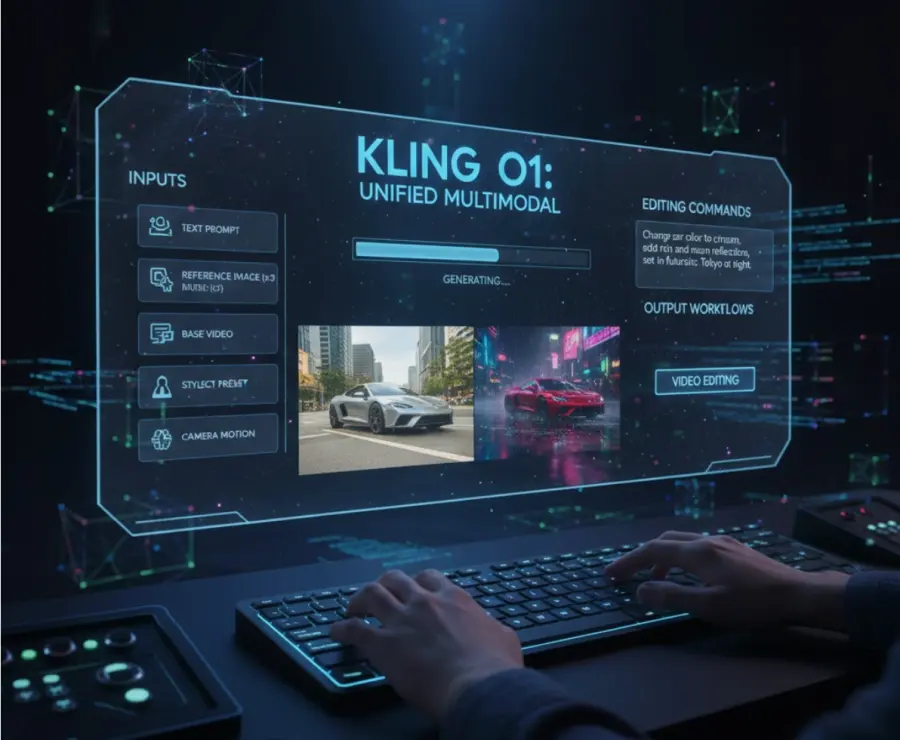
Kling O1 boasts unified multimodal processing. It easily ingests and analyzes up to seven distinct data inputs simultaneously. This multi-input processing gives Kling O1 a profound advantage in maintaining contextual awareness.
A standout feature within Kling O1 is the advanced "Subject" tracking system. You can upload multiple reference angles of a specific character or product. Kling O1 memorizes these physical attributes. It then guarantees consistent geometric and visual representation across totally different scenes and generations. This solves one of the biggest historic challenges in AI video: character consistency.
Supported Input Modalities
Kling O1 achieves its impressive results by synthesizing multiple forms of guidance. You are not limited to just typing a text prompt. You can orchestrate a symphony of inputs to achieve exact results.
- Natural language text prompts and detailed scene descriptions.
- Visual reference images providing multiple character angles.
- Base video files serving as structural foundations for editing.
- Subject preset data for strict character consistency.
- Aesthetic style references for precise visual grading.
- Start and end frame designations for perfect looping and transitions.
- Specific camera movement syntax (e.g., pan, tilt, zoom, dolly).
The Multi-Elements Video Editing Revolution
The true crown jewel of Kling O1 is its revolutionary Multi-Elements editing mode. This mode empowers you to radically alter existing video files using simple text commands. Traditional non-linear editors (NLEs) require tedious manual masking, rotoscoping, and complex keyframing to alter a moving subject.
Kling O1 eliminates this manual labor. You issue a natural language instruction, and the MVL architecture handles the heavy computational lifting. It accurately isolates the subject, tracks the motion, applies the edit, and re-renders the lighting and shadows. Kling O1 makes voice-command video editing a practical, everyday reality.
Analyzing the Strengths and Weaknesses of Kling O1
Any disruptive technology requires objective analysis. While Kling O1 is incredibly powerful, understanding its current operational boundaries ensures better creative results.
The Advantages of Kling O1
The workflow efficiency provided by Kling O1 is unmatched. It completely eliminates the frustrating need to switch between specialized generation tools and separate post-production software. Everything happens inside the Kling O1 ecosystem.
The natural language interface democratizes high-end visual effects. Complex edits that previously required a seasoned VFX artist are now accessible to anyone who can type a descriptive sentence. Furthermore, Kling O1 maintains exceptional visual consistency across dense, multi-subject scenes. The simultaneous processing of multiple input types grants users unprecedented creative freedom and precise directorial control.
Current Limitations of Kling O1
Despite its brilliance, early adopters of Kling O1 must navigate a few constraints. Currently, native generation duration is optimized for 3 to 10-second clips. Creating longer narratives requires generating multiple sequential clips and stitching them together.
Additionally, while Kling O1 excels at single-subject tracking, multi-subject recognition in highly chaotic scenes occasionally needs refinement. Background elements might shift slightly during complex motion sequences. Image quality presentation can also vary depending on the specificity of the prompt. Mastery of Kling O1 requires active experimentation to discover the most effective prompting structures.
How Kling O1 Disrupts Traditional Production
Kling O1 marks a definitive turning point in media production. Creating and editing high-fidelity videos through conversational commands has transitioned from an experimental novelty into a dependable production reality. For decades, traditional video creation relied on an immutable truth: premium quality demanded expensive camera gear, large specialized crews, and massive time investments.
Kling O1 violently shatters this assumption. It provides Hollywood-level manipulation capabilities to solo creators operating from a laptop.
Real-World Impact Scenarios
Consider the daily reality of a modern marketing agency. A creative team needs to test multiple advertisement variations. They want to swap product colors, change background environments, and test different lighting styles. Traditionally, this meant expensive on-location reshoots or grueling hours spent rotoscoping in After Effects.
With Kling O1, this workflow is compressed into minutes. The team uploads a single base video. They use the Multi-Elements mode to type variations. "Change the car color to midnight blue." "Swap the studio background for a sunlit forest." Kling O1 executes these instructions flawlessly. Tasks that previously drained production budgets are now completed at a fraction of the cost. Kling O1 essentially democratizes top-tier post-production.
Kling O1 in Action: Practical Examples
To truly grasp the capabilities of Kling O1, we must look at concrete examples of its editing prowess. The ability to seamlessly add or remove dynamic elements from a moving shot is where Kling O1 truly shines.
Dynamic Content Addition
Kling O1 can inject entirely new elements into a scene while respecting the original physics, lighting, and motion blur. This is a massive leap forward from static image editing.
Example 1: Wardrobe Augmentation
Imagine a source video featuring three animated penguins walking side-by-side. You want to alter the central character. You feed the video into Kling O1 with the prompt: "Add a sharp tuxedo and black sunglasses to the penguin in the middle."
Kling O1 analyzes the sequence. It generates the clothing, maps it perfectly to the character's unique walking gait, and outputs a flawless composite. The original motion remains entirely undisturbed.

Example 2: Prop Integration
Consider a generated video of a dramatic opera singer performing on stage. You decide the scene needs more mystery. You prompt Kling O1: "Add an ornate masquerade mask to her face."
Kling O1 executes the addition perfectly. It tracks the singer's micro-expressions and head movements. The mask catches the stage lighting correctly and casts appropriate shadows on her skin, preserving the scene's dynamic lighting.

Intelligent Element Removal
Removing unwanted elements from moving footage is notoriously difficult. Frame-by-frame cloning and background plate generation usually take hours. Kling O1 automates this instantly.
Example 3: Crowd Erasure
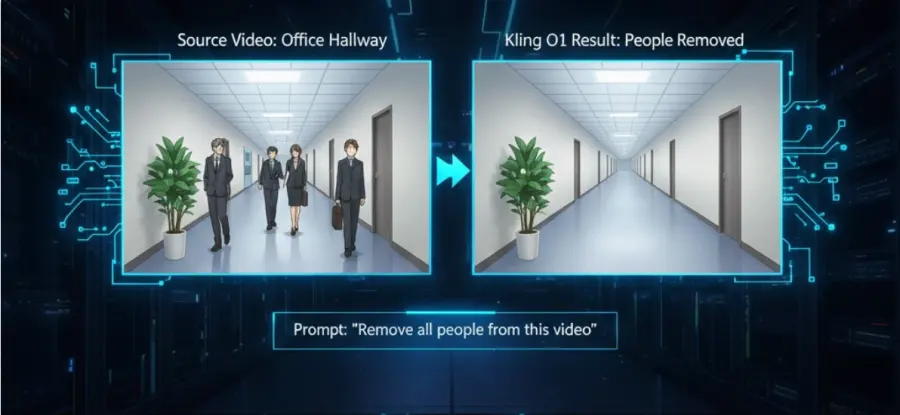
You have footage of a busy modern office hallway filled with people walking. You need an empty, liminal space. You instruct Kling O1: "Remove all people from the video entirely."
Kling O1 identifies every human subject, maps the background geometry, and smoothly erases the individuals. It realistically generates the missing walls, floors, and reflections behind them. The result is a completely empty, pristine hallway.
Example 4: Specific Character Deletion
In an animated scene featuring multiple characters, you wish to isolate the narrative. Using a source video featuring Doraemon and Suneo, you prompt Kling O1: "Make the character Suneo disappear from this specific scene."
Kling O1 surgically removes the requested character. It flawlessly reconstructs the animated background elements that were previously obscured. The remaining characters continue their motion without any artifacting or visual tearing.

Targeted Scene Modification
Beyond simple additions and removals, Kling O1 excels at holistic environmental transformations. You can radically alter the setting without affecting the core action of the video.
If you feed Kling O1 a video of an empty asphalt lot, you can prompt it to "Make the ground violently crack open." Kling O1 generates realistic, expanding fissures that track perfectly with any existing camera movement. If you provide footage of a bustling daytime city street, you can command Kling O1 to "Change the environment to a heavy winter snowstorm." The AI will alter the lighting, add falling snow, and cover the static elements in frost.
These targeted modifications extend to characters. A fashion model walking down a runway can have her hair color changed from blonde to vibrant red via a text command. Kling O1 accurately masks the hair, applies the color shift, and ensures the new color reflects light accurately without bleeding onto her garments.
Automated Green Screen Extraction
One of the most requested features in modern video production is rapid subject isolation. Kling O1 introduces a highly practical, automated green screen conversion tool. This feature alone justifies the adoption of Kling O1 for many professional editors.
Traditional green screen compositing requires meticulously lit studio setups, expensive backdrops, and specialized software to pull clean chroma keys. Manually rotoscoping a subject shot in a natural environment is agonizingly slow. Kling O1 bypasses this entirely.
You can prompt Kling O1 to "Convert the video to a green screen, keeping only the main character." Kling O1 analyzes the depth of field, identifies the subject's edges, and replaces the entire background with pure chroma green. It handles difficult edge cases like wispy hair, transparent fabrics, and motion blur with startling accuracy. Post-production compositing instantly becomes accessible to creators lacking studio resources.
Advanced Action and Motion Transfer
Kling O1 pushes the boundaries of AI animation by enabling highly sophisticated motion transfer. You can use the physical movements from one video to puppeteer a completely different character in another.
Imagine you have a source video of a professional hip-hop dancer executing a complex routine. You want an animated character to perform the exact same dance. You provide Kling O1 with an image of your target character. You then prompt: "Replace the dancer in the video with this character, maintaining all movements."
Kling O1 analyzes the skeletal structure and kinetic energy of the original dancer. It then maps that exact choreography onto your new character. It adjusts for different bodily proportions while maintaining the specific performance qualities, weight shifts, and rhythmic timing. Kling O1 effectively functions as a markerless motion capture studio.
Seamless Style Transformation
Applying comprehensive artistic styles to existing video often results in aggressive flickering and temporal instability. Kling O1 solves this through its unified MVL architecture. The style transfer is deeply integrated into the generation process.
You can take standard, live-action footage and ask Kling O1 to "Convert everything to a retro 16-bit pixel art style." Kling O1 redesigns the visual aesthetic while maintaining the structural integrity of the scene. You can transform a modern daytime shot into a gritty, neon-soaked cyberpunk environment. You can even instruct Kling O1 to apply the specific brushstrokes of an impressionist painter to a moving landscape. The results are consistently stable and visually striking.
Comparing Kling O1 to the Competition
The AI video market is highly competitive. However, Kling O1 stands out due to its specific architectural choices. When benchmarked against heavyweights like Google Veo 3.1 and Runway Gen-3, Kling O1 reveals distinct workflow advantages.
While Veo and Gen-3 offer phenomenal generation quality, their editing capabilities often feel bolted on or require complex separate workflows. Kling O1 is built from the ground up for unified native editing. Its ability to process up to seven simultaneous inputs provides granular control that single-prompt systems cannot match.
Character consistency is another major differentiator. Because Kling O1 utilizes its subject preset system, it maintains facial features and clothing details across varying camera angles much better than platforms relying solely on zero-shot generation.
API Access: Kling O1 on GPT Proto
For software developers and enterprise teams, integrating breakthrough AI models can be a logistical nightmare. Dealing with changing API endpoints, unpredictable rate limits, and vendor lock-in stifles innovation. Kling O1 is set to change this narrative through strategic platform availability.

The highly anticipated Kling O1 model is arriving on GPT Proto in the coming days. It will join an already robust lineup of Kling foundation models. Developers will gain immediate access to the entire Kling ecosystem through a single, streamlined API connection.
This integration is crucial for building scalable applications. Whether you need the blistering speed of kling-v2.1-master/text-to-video, the cinematic fidelity of kling-v2.5-turbo-pro, or the unified editing supremacy of Kling O1, GPT Proto handles the backend complexity.
Why Developers Choose GPT Proto for Kling O1
GPT Proto acts as the ultimate aggregator for top-tier AI models. It provides a single integration point, meaning development teams write code once and can instantly swap between providers. This eliminates the massive technical debt associated with maintaining multiple API integrations.
Cost predictability is another massive benefit. The GPT Proto AI API platform operates on a transparent pay-as-you-go model. Developers enjoy substantial volume discounts, often saving up to 86% compared to direct vendor pricing. When Kling O1 launches on the platform, teams can integrate unified video editing features without blowing up their server budgets.
Furthermore, GPT Proto offers comprehensive coverage. You can access Kling O1 for video, pair it with elite image models, and utilize advanced LLMs for prompt enhancement, all within the same billing ecosystem. The detailed model directory at https://gptproto.com/model provides everything a technical team needs to deploy Kling O1 into production environments confidently.
Frequently Asked Questions About Kling O1
What exactly sets Kling O1 apart from older AI video generators?
Kling O1 fundamentally differs by offering a unified multimodal architecture. Older platforms force you to choose: either generate new video from scratch or use a different tool to edit an existing clip. Kling O1 does both natively. Its Multi-Elements mode allows you to alter existing footage entirely through conversational text commands. Furthermore, Kling O1 can process text, images, subject presets, and structural references simultaneously, offering unparalleled control.
How fast does Kling O1 generate and edit videos?
Processing times with Kling O1 depend heavily on the complexity of your request. A standard 5-second text-to-video generation usually takes between 30 and 90 seconds. If you are executing a dense Multi-Elements edit involving motion transfer, green screen extraction, and style transformation, the process may take 2 to 4 minutes. Kling O1 prioritizes high-fidelity output and visual stability over raw speed.
Is content created by Kling O1 safe for commercial use?
Absolutely. You can leverage Kling O1 for commercial marketing, filmmaking, and social media monetization. If you access the model via the official Kling web interface, ensure you review their specific commercial terms based on your credit tier. When integrating Kling O1 via professional API platforms like GPT Proto, commercial licensing is inherently structured into the enterprise usage agreements.
Are there specific use cases where Kling O1 struggles?
While Kling O1 is revolutionary, it is still evolving. Currently, it limits single generations to a 3-to-10-second window. Pushing beyond this requires manual clip stitching. Kling O1 also occasionally struggles with persistent object permanence in wildly chaotic scenes with multiple overlapping subjects. Fast, erratic camera movements can sometimes confuse the motion tracking during complex style transfers. However, for controlled, short-form editing, Kling O1 performs exceptionally well.
The Future with Kling O1
The introduction of Kling O1 is not merely an iterative software update. It is a fundamental shift in the grammar of video creation. By fusing generation and structural editing into a single intelligence that responds to natural language, Kling O1 redefines who gets to be a video creator. The steep technical barriers that once protected the high-end video production industry are rapidly dissolving.
Looking back at the rapid progression from Kling 1.0 to Kling O1, the trajectory is clear. We are witnessing the birth of true conversational video production. Future generations of creators will view Kling O1 as the definitive turning point—the moment when editing moving images became as intuitive as typing a sentence.
For independent filmmakers, digital marketers, and software developers, Kling O1 is a mandatory tool. It offers an incredible glimpse into a future where your creative output is limited only by your imagination, rather than your budget or technical expertise. As Kling O1 continues to refine its architecture, the concept of manual video editing will soon feel as archaic as cutting physical film strips.


