GPT Proto

Ultra-realistic Sports Broadcast

AI Ultra Realistic Sports Broadcast Generator

Produce an ultra realistic sports broadcast from text or images instantly using our advanced AI video engine to capture authentic live stadium vibes.

Preserve Facial Identity

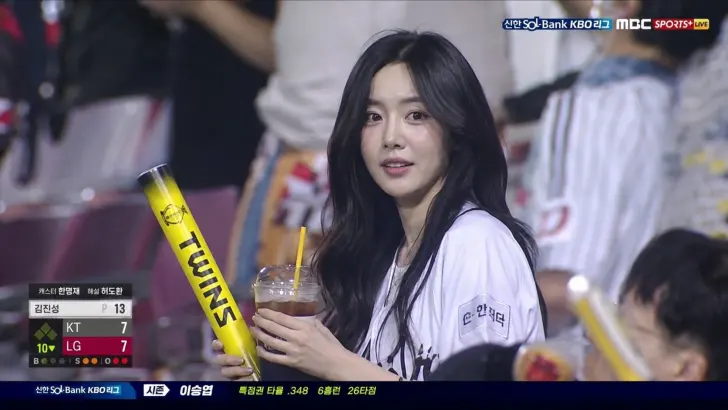
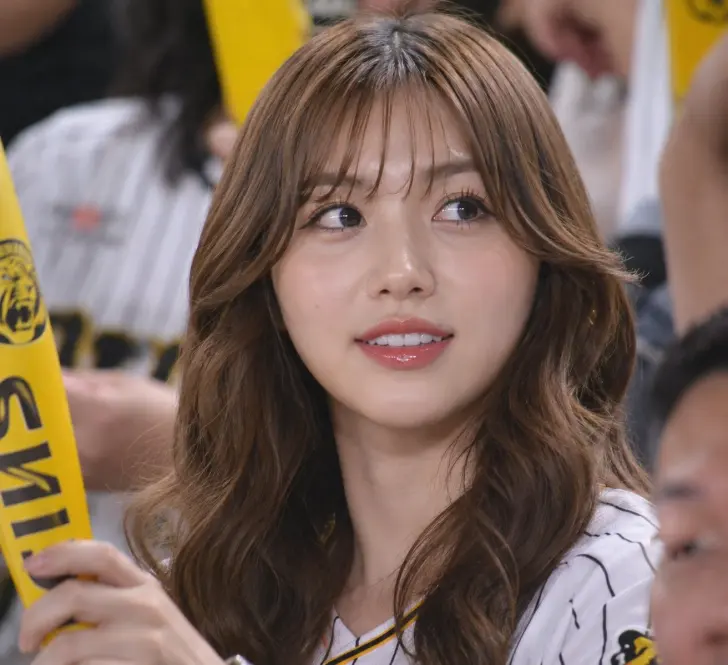
Upload a photo to seamlessly place your exact subject into a live sports broadcast crowd. The AI maintains perfect facial consistency effortlessly.

Ultra-realistic sports broadcast still of a glamorous woman sitting in a packed football stadium crowd during a night match, wearing a dark brown sleeveless high-neck satin top and black square earrings, shoulder-length light brown/blonde hair styled in soft waves. She is casually drinking from a tall blue aluminum can while holding a half-eaten cheeseburger in the other hand. Around her are fans in bright yellow and blue football jerseys and scarves, creating strong team-color contrast. The scene feels candid and cinematic, captured mid-game from a TV broadcast camera angle with shallow depth of field. Include realistic stadium seating, crowded audience atmosphere, broadcast overlay graphics in the top-left corner showing a live football score and match timer, and a sports network watermark in the top-right. Natural arena lighting, detailed skin texture, sharp focus on the woman, slightly blurred background crowd, authentic live sports broadcast aesthetic, 16:9 composition.

Prompt
After

Authentic Broadcast Effects

Add natural crowd reactions, live graphics, and telephoto lens compression to every ultra realistic sports broadcast you generate on GPTProto.

Before · Authentic Broadcast Effects
Before
After

Professional Camera Angles

Emulate the exact look of real matches. Our AI captures the genuine candid feel of a professional sports broadcast with perfect framing.

Before · Professional Camera Angles
Before
After

Text to Live Arena Video

Type your stadium scene and let AI build a realistic sports broadcast complete with arena lighting, crowd noise, and dynamic live camera angles.

Ultra-realistic F1 live TV broadcast screenshot, identity preserved exactly from reference image. Young woman sitting in the VIP paddock / team garage during a Formula 1 race, shown on the official live race broadcast as the girlfriend of an F1 driver. It is the final lap, and she is listening to the team radio through a professional racing headset, watching the garage monitors nervously, leaning forward with one hand near her mouth, proud tense expression. She wears a fitted white tank top, oversized racing team jacket draped over her shoulders, large black team-radio headset with boom mic, gold jewelry, soft glam makeup. A slim paddock pass hangs naturally from her neck. Add realistic F1 broadcast graphics: “FINAL LAP” banner, lap counter showing final lap, driver timing tower on the left, small F1-style logo bug, “LIVE” indicator, lower-third identifying her as driver partner / paddock guest. No fake oversized badge, no selfie angle. Team staff, headsets, garage screens, mechanics, and race equipment blurred around her. Telephoto broadcast camera from across the garage, compression artifacts, digital noise, bright paddock lighting, natural skin texture, no smoothing, 8k quality

Prompt
After

Frequently Asked Questions

What makes this an ultra realistic sports broadcast generator?

Our AI deeply analyzes professional live arena footage to accurately replicate telephoto lens compression, authentic digital noise, and accurate stadium lighting for your generated scenes.

Can I put myself in an ultra realistic sports broadcast?

Yes! By uploading your selfie, GPTProto's AI will maintain your facial identity while seamlessly placing you into a lively stadium broadcast crowd.

How do I add live score graphics to my video?

Simply describe the overlays in your prompt. The AI will weave timing towers, scoreboards, and lower-thirds directly into your ultra realistic sports broadcast.

What types of matches can I create?

You can generate anything from a night football match to a high-speed racing paddock or a baseball game. Any athletic event is possible with the right text prompt.

How long does it take to render a sports broadcast clip?

Producing a realistic sports video takes just a few moments. The AI engine processes high-quality cinematic footage almost instantly.

Does the background crowd look authentic?

Absolutely. The background fans in your AI sports broadcast feature natural motion blur, authentic cheering actions, and accurate team colors.

Is this video generation tool free to try?

GPTProto offers a free trial tier so you can test our AI video capabilities and generate your first ultra realistic sports broadcast at no cost.

Can I use custom team jerseys in the generation?

Yes, just describe the jersey colors, styles, and logos in your text prompt. The AI will integrate those exact details into your sports broadcast footage.

Testimonials

As a creator, making an ultra realistic sports broadcast for my channel used to take days of editing. This AI does it in seconds!

Mark T.

Video Editor

The telephoto lens effect is incredible. My generated live sports broadcast looks exactly like a real TV feed from a major football match.

Sarah J.

Digital Creator

I uploaded a photo and the AI put me right into an ultra realistic sports broadcast at a baseball game. My friends actually thought I was on live TV!

Leo K.

Sports Fan

Prompting for a racing paddock scene worked flawlessly. The AI sports broadcast details like professional headsets and monitors were spot on.

Elena R.

3D Artist

Fantastic video generator. The background fan blur and stadium lighting feel so authentic compared to other AI video tools I have tried.

David W.

Producer

I love how I can add live score graphics just by typing it into the prompt. The genuine aesthetic is perfectly captured by this AI platform.

Amit P.

Streamer

Produces stunningly ultra realistic sports broadcast scenes, though I wish I could extend the video length beyond the default duration.

Chloe M.

Marketer

The facial consistency when uploading an image is amazing. It kept my exact features while creating a realistic stadium broadcast clip.

Jason L.

Designer

Capturing that candid live TV camera angle is tricky, but this AI tool nails the imperfect framing and subtle broadcast noise perfectly.

Rachel B.

Media Director

Best AI platform for sports content hands down. I easily created an ultra realistic sports broadcast of a lively tennis match crowd.

Tom H.

VFX Supervisor

As a creator, making an ultra realistic sports broadcast for my channel used to take days of editing. This AI does it in seconds!

Mark T.

Video Editor

The telephoto lens effect is incredible. My generated live sports broadcast looks exactly like a real TV feed from a major football match.

Sarah J.

Digital Creator

I uploaded a photo and the AI put me right into an ultra realistic sports broadcast at a baseball game. My friends actually thought I was on live TV!

Leo K.

Sports Fan

Prompting for a racing paddock scene worked flawlessly. The AI sports broadcast details like professional headsets and monitors were spot on.

Elena R.

3D Artist

Fantastic video generator. The background fan blur and stadium lighting feel so authentic compared to other AI video tools I have tried.

David W.

Producer

I love how I can add live score graphics just by typing it into the prompt. The genuine aesthetic is perfectly captured by this AI platform.

Amit P.

Streamer

Produces stunningly ultra realistic sports broadcast scenes, though I wish I could extend the video length beyond the default duration.

Chloe M.

Marketer

The facial consistency when uploading an image is amazing. It kept my exact features while creating a realistic stadium broadcast clip.

Jason L.

Designer

Capturing that candid live TV camera angle is tricky, but this AI tool nails the imperfect framing and subtle broadcast noise perfectly.

Rachel B.

Media Director

Best AI platform for sports content hands down. I easily created an ultra realistic sports broadcast of a lively tennis match crowd.

Tom H.

VFX Supervisor

Ready to Use These AI Models in Your Workflow?