GPT Proto

AI Image Editor

Preview image

Advanced AI Image Editor API For Developers

Integrate our powerful AI image editor today. Automate background removal, pixel-perfect prompt adjustments, plus style variations within your custom AI platform seamlessly.

Uncensored AI Image Editor

Deploy flexible programmatic tools handling creative workflows without severe filter limits. Our provided API delivers raw, precise photo editing results consistently.

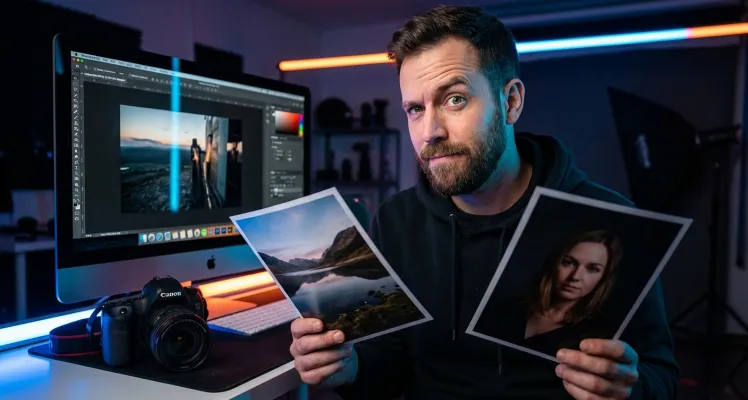
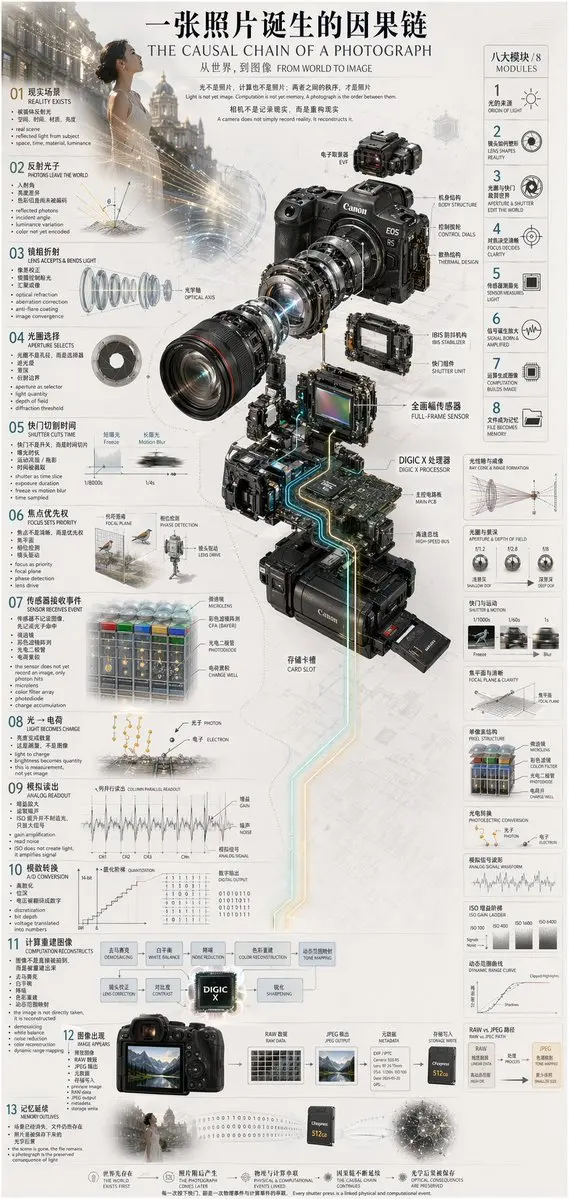
Generates a highly detailed, multi-step technical infographic featuring an exploded view diagram of a complex device. { "type": "technical infographic", "subject": "{argument name=\"subject matter\" default=\"digital photography process\"}", "header": { "title": "{argument name=\"main title\" default=\"一张照片诞生的因果链 THE CAUSAL CHAIN OF A PHOTOGRAPH\"}", "subtitle": "从世界,到图像 FROM WORLD TO IMAGE" }, "centerpiece": { "description": "Exploded isometric view of a modern mirrorless camera", "model": "{argument name=\"camera model\" default=\"Canon EOS R5\"}", "labeled_parts_count": 12, "labeled_parts": [ "EVF", "Body Structure", "Control Dials", "Thermal Design", "Optical Axis", "IBIS Stabilizer", "Shutter Unit", "Full-Frame Sensor", "{argument name=\"processor name\" default=\"DIGIC X Processor\"}", "Main PCB", "High-Speed Bus", "Card Slot" ] }, "layout": { "left_column": { "description": "Chronological causal chain", "count": 13, "steps": [ "01 REALITY EXISTS", "02 PHOTONS LEAVE THE WORLD", "03 LENS ACCEPTS & BENDS LIGHT", "04 APERTURE SELECTS", "05 SHUTTER CUTS TIME", "06 FOCUS SETS PRIORITY", "07 SENSOR RECEIVES EVENT", "08 LIGHT BECOMES CHARGE", "09 ANALOG READOUT", "10 A/D CONVERSION", "11 COMPUTATION RECONSTRUCTS", "12 IMAGE APPEARS", "13 MEMORY OUTLIVES" ] }, "right_column": { "title": "八大模块 / 8 MODULES", "count": 8, "modules": [ "1 ORIGIN OF LIGHT", "2 LENS SHAPES REALITY", "3 APERTURE & SHUTTER EDIT THE WORLD", "4 FOCUS DECIDES CLARITY", "5 SENSOR MEASURES LIGHT", "6 SIGNAL BORN & AMPLIFIED", "7 COMPUTATION BUILDS IMAGE", "8 FILE BECOMES MEMORY" ] }, "side_diagrams": { "count": 7, "descriptions": [ "Ray cone & image formation", "Aperture & depth of field", "Shutter & motion", "Focal plane & clarity", "Pixel structure", "Photoelectric conversion", "Analog signal waveform" ] }, "footer": { "count": 5, "description": "Philosophical summary points" } }, "style": "technical, precise, wireframe elements, glowing data lines, photorealistic camera components, clean typography, dual-language" }

Prompt
Uncensored AI Image Editor
After

Generative Fill AI Image Editor

Enhance any design studio utilizing an AI backend featuring generative fill capabilities. Our system makes every AI modification seamlessly blend into canvases.

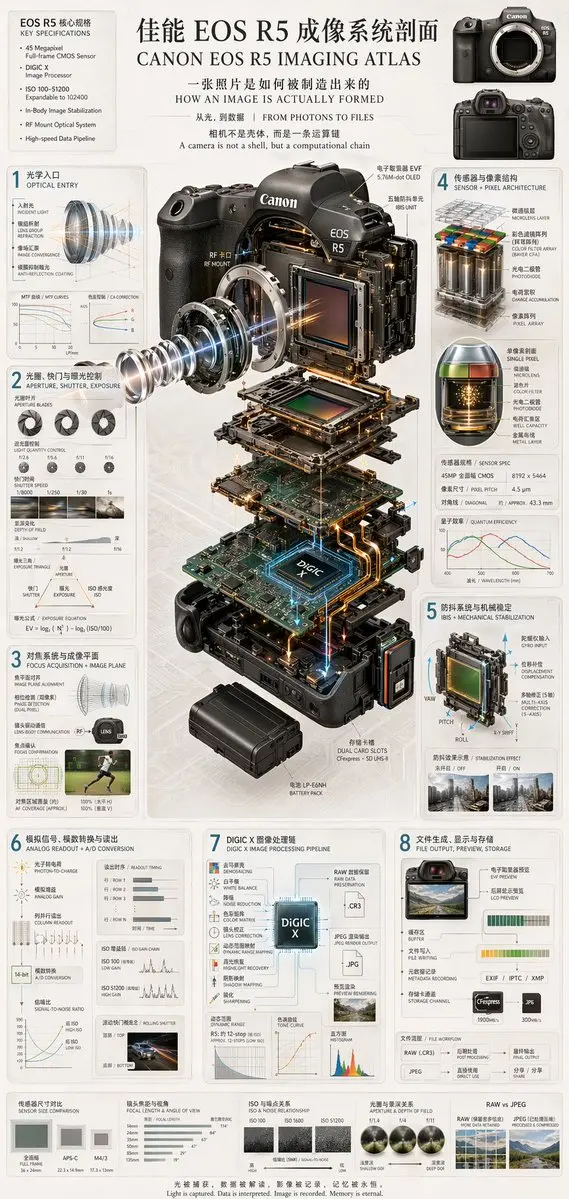
Generates a highly detailed, multi-panel technical infographic featuring a 3D exploded view of a camera and 8 numbered sections explaining the imaging process. { "type": "technical infographic and exploded view diagram", "header": { "title": "{argument name=\"main title\" default=\"佳能 EOS R5 成像系统剖面 CANON EOS R5 IMAGING ATLAS\"}", "subtitles": [ "一张照片是如何被制造出来的 HOW AN IMAGE IS ACTUALLY FORMED", "从光,到数据 | FROM PHOTONS TO FILES", "相机不是壳体,而是一条运算链 A camera is not a shell, but a computational chain" ], "top_left_box": { "title": "EOS R5 核心规格 KEY SPECIFICATIONS", "bullet_points_count": 6 }, "top_right_images": { "count": 2, "description": "front and back views of the camera body" } }, "centerpiece": { "description": "highly detailed 3D exploded view of the {argument name=\"camera model\" default=\"Canon EOS R5\"} camera, showing internal components separated vertically", "components_visible": [ "lens mount", "lens elements with glowing blue light rays", "image sensor", "motherboard with glowing {argument name=\"processor name\" default=\"DIGIC X\"} chip", "battery pack", "dual card slots", "electronic viewfinder (EVF)" ] }, "layout": { "numbered_sections": [ { "number": 1, "title": "光学入口 OPTICAL ENTRY", "elements": ["lens cross-section with light rays", "2 line graphs"] }, { "number": 2, "title": "光圈、快门与曝光控制 APERTURE, SHUTTER, EXPOSURE", "elements": ["3 aperture blade diagrams", "4 shutter speed example photos", "depth of field diagram", "exposure triangle diagram"] }, { "number": 3, "title": "对焦系统与成像平面 FOCUS ACQUISITION + IMAGE PLANE", "elements": ["lens alignment diagram", "AF coverage photo of a runner"] }, { "number": 4, "title": "传感器与像素结构 SENSOR + PIXEL ARCHITECTURE", "elements": ["3D pixel array diagram", "single pixel cross-section diagram", "sensor spec table", "quantum efficiency graph"] }, { "number": 5, "title": "防抖系统与机械稳定 IBIS + MECHANICAL STABILIZATION", "elements": ["sensor shift mechanism diagram with yaw/pitch/roll axes", "2 stabilization effect comparison photos"] }, { "number": 6, "title": "模拟信号、模数转换与读出 ANALOG READOUT + A/D CONVERSION", "elements": ["signal flowchart", "3 readout timing graphs", "signal-to-noise ratio graph", "rolling shutter example photo of a car"] }, { "number": 7, "title": "DIGIC X 图像处理链 DIGIC X IMAGE PROCESSING PIPELINE", "elements": ["processing flowchart with central chip", "dynamic range graph", "tone curve graph", "histogram"] }, { "number": 8, "title": "文件生成、显示与存储 FILE OUTPUT, PREVIEW, STORAGE", "elements": ["file output flowchart", "2 storage card icons", "file workflow diagram"] } ], "bottom_comparisons": { "count": 5, "labels": [ "传感器尺寸对比 SENSOR SIZE COMPARISON", "镜头焦距与视角 FOCAL LENGTH & ANGLE OF VIEW", "ISO 与噪点关系 ISO & NOISE RELATIONSHIP", "光圈与景深关系 APERTURE & DEPTH OF FIELD", "RAW vs JPEG" ] }, "footer": "{argument name=\"footer quote\" default=\"光被捕获,数据被解读,影像被记录,记忆被永恒。 Light is captured. Data is interpreted. Image is recorded. Memory is eternal.\"}" }, "style": "clean, technical, highly detailed, photorealistic components, blueprint-style annotations, light gray background, precise typography" }

Prompt
Generative Fill AI Image Editor
After

Batch Style AI Image Editor

Create consistent variations using robust programmatic controls. This robust system processes batches, maintaining perfect style aesthetics across every single generated output file.

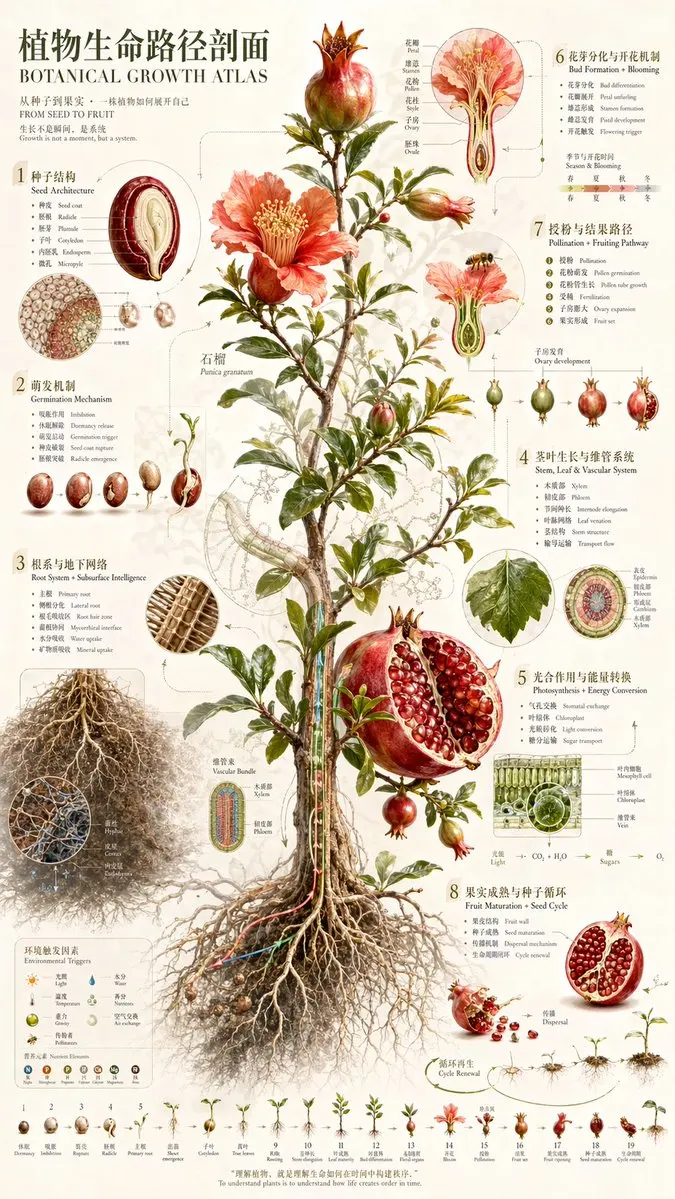
Generates a highly detailed, vintage-style botanical infographic detailing the complete life cycle and anatomy of a plant. { "type": "scientific botanical infographic poster", "subject": "{argument name=\"plant species\" default=\"Pomegranate (Punica granatum)\"}", "style": "vintage botanical illustration mixed with modern infographic design, highly detailed, {argument name=\"color palette\" default=\"earthy greens, deep reds, parchment background\"}", "header": { "main_title": "{argument name=\"main title\" default=\"植物生命路径剖面\"}", "english_title": "{argument name=\"english title\" default=\"BOTANICAL GROWTH ATLAS\"}", "subtitle": "从种子到果实,一株植物如何展开自己 / FROM SEED TO FRUIT" }, "centerpiece": "full plant showing extensive root system, woody stem, green leaves, blooming red flowers, and ripe fruits including one halved to show seeds", "layout": { "numbered_sections": [ { "number": 1, "title": "种子结构 / Seed Architecture", "content": "cross-section of a single seed with 6 labeled parts" }, { "number": 2, "title": "萌发机制 / Germination Mechanism", "content": "sequence of 5 sprouting seeds showing radicle emergence" }, { "number": 3, "title": "根系与地下网络 / Root System + Subsurface Intelligence", "content": "detailed root network with 2 circular microscopic cross-sections showing vascular bundles and hyphae" }, { "number": 4, "title": "茎叶生长与维管系统 / Stem, Leaf & Vascular System", "content": "leaf detail and circular stem cross-section with 5 labeled layers" }, { "number": 5, "title": "光合作用与能量转换 / Photosynthesis + Energy Conversion", "content": "3D cellular cross-section of a leaf showing mesophyll and chloroplasts, plus a chemical equation diagram" }, { "number": 6, "title": "花芽分化与开花机制 / Bud Formation + Blooming", "content": "detailed flower cross-section showing stamen and ovary, plus a 4-season timeline" }, { "number": 7, "title": "授粉与结果路径 / Pollination + Fruiting Pathway", "content": "bee approaching a flower cross-section, followed by a sequence of 5 stages of ovary development into a fruit" }, { "number": 8, "title": "果实成熟与种子循环 / Fruit Maturation + Seed Cycle", "content": "ripe fruit breaking open, seeds dispersing downwards to a new sprout" } ], "additional_elements": [ { "position": "bottom left", "title": "环境触发因素 / Environmental Triggers", "content": "grid of 6 weather/environmental icons and 6 nutrient element icons (N, P, K, Ca, Mg, Fe)" }, { "position": "bottom edge", "title": "Growth Timeline", "content": "linear sequence of 19 small plant icons showing the complete life cycle from seed to mature plant" } ], "footer_quote": "{argument name=\"bottom quote\" default=\"理解植物,就是理解生命如何在时间中构建秩序。\"}" } }

Prompt
Batch Style AI Image Editor
After

Pixel-Perfect AI Image Editor

Leverage our core API for processing visual data via text prompts. Build superior platforms offering instant background removal alongside rapid AI shifts.

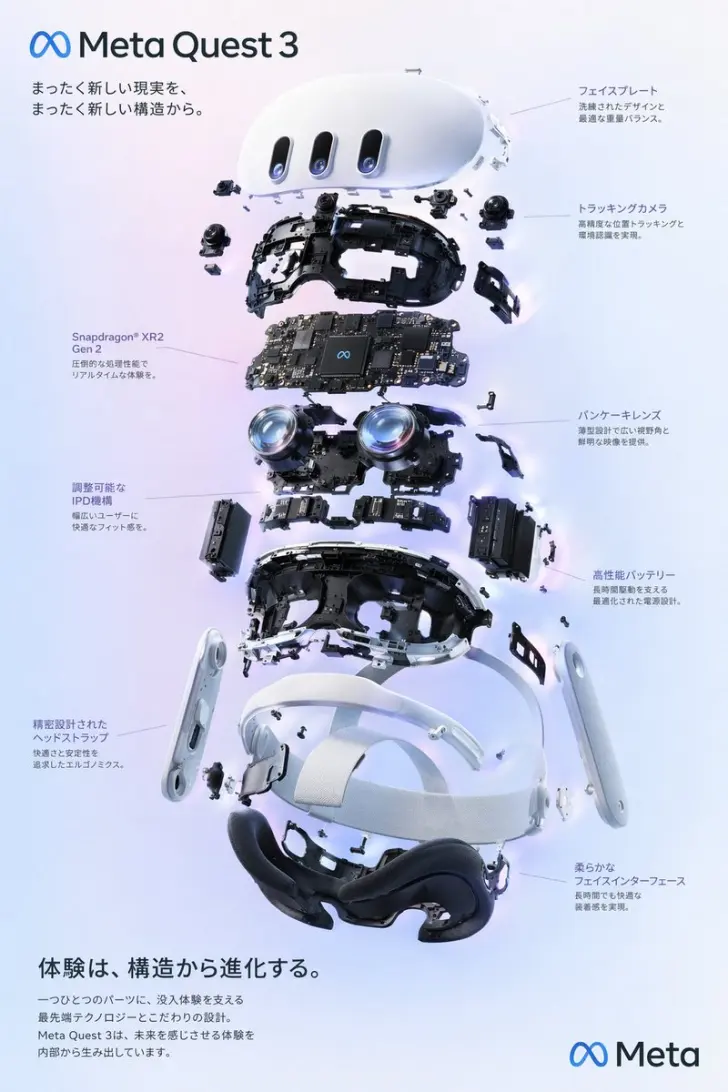
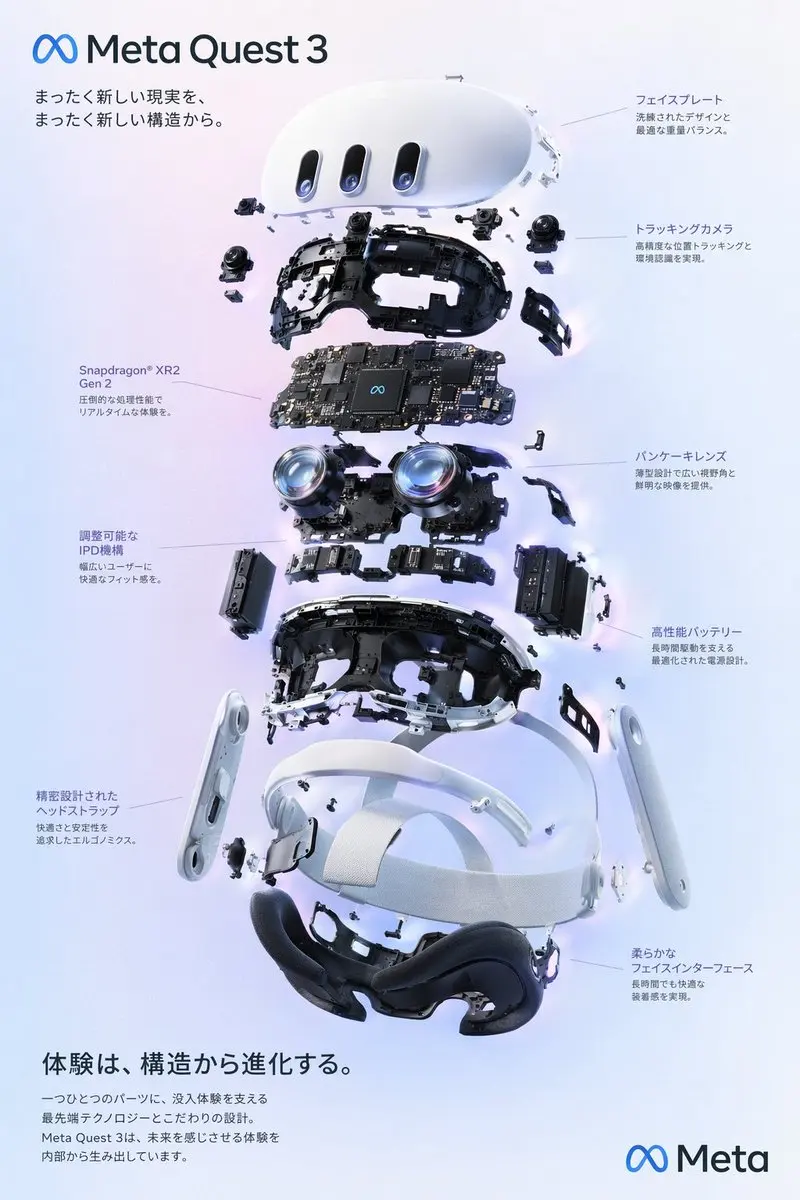
{ "type": "Product Exploded View Poster", "subject": "VR Headset", "style": "Clean high-tech 3D rendering, studio lighting, glowing accents", "background": "{argument name=\"background color\" default=\"Soft purple-blue gradient\"}", "header": { "logo": "∞ {argument name=\"product name\" default=\"Meta Quest 3\"}", "subtitle": "{argument name=\"main catchphrase\" default=\"Redefine a new reality with a new architecture.\"}" }, "layout": { "centerpiece": "Vertical stacked exploded view of a VR headset, showcasing 9 distinct internal layers: housing, camera sensors, mainboard with chips, Pancake lenses, internal frame, battery pack, side strap, top head strap, and facial interface cushion.", "callout_labels": { "count": 8, "left_side": [ "Snapdragon® XR2 Gen 2\nExceptional processing power for real-time immersion.", "Adjustable IPD Mechanism\nProvides a comfortable fit for a wide range of users.", "Precision Head Strap\nErgonomically designed for comfort and stability." ], "right_side": [ "Front Panel\nRefined design with optimized weight balance.", "Tracking Cameras\nEnable high-precision positional tracking and environment awareness.", "Pancake Lenses\nSlim design, offering a wide field of view and sharp visuals.", "High-performance Battery\nAdvanced power design supporting extended use.", "Soft Facial Interface\nEnsures comfort even during long sessions." ] }, "footer": { "left_text_block": { "headline": "{argument name=\"bottom headline\" default=\"Experience, born from the evolution of structure.\"}", "body": "Every component embodies cutting-edge technology and meticulous design, supporting an immersive experience. Meta Quest 3 builds the future from within, delivering the unimaginable." }, "right_logo": "∞ Meta" } } }

Prompt
Pixel-Perfect AI Image Editor
After

Frequently Asked Questions

What makes this AI image editor API exceptional?

Our technology offers pixel-perfect generation via prompt API. It acts as a powerful backend, handling background removal and complex AI generative fill tasks seamlessly.

Can developers use this AI image editor for batch processing?

Yes, you can automate customized API workflows. The system effortlessly processes multiple files, applying consistent AI style shifts plus visual variations instantly.

Does the AI image editor API support uncensored creative edits?

Our versatile platform allows highly creative, unfiltered AI outputs depending upon your prompt parameters, becoming an ideal solution for diverse design needs.

How does the AI image editor manage background removal?

It uses advanced API depth estimation separating subjects cleanly. It works effectively just like dedicated background relighting tools inside any AI application.

Can teams build a design studio using this AI image editor?

Absolutely. This API integration provides endpoints for prompt-based adjustments, letting creators construct comprehensive tools tailored toward professional AI design pipelines.

Is integrating this AI image editor straightforward?

Yes, the provided endpoint features detailed documentation. Programmers can easily embed such intelligent capabilities directly inside their own native AI software ecosystems.

What kind of style consistency does the AI image editor offer?

This advanced software excels at generating variations while locking specific aesthetics. It remains highly reliable for maintaining brand identity everywhere.

Does the AI image editor handle localized generative fill?

Yes, it allows users specifying regions for generative fill utilizing intuitive text prompts, rivaling top-tier AI design software suites perfectly.

Testimonials

I canceled expensive subscriptions, opting for this AI image editor instead. Its provided AI background removal proves utterly flawless.

David L.

Software Developer

Integrating this AI image editor into our application felt simple. Delivering pixel-perfect edits using basic text prompts works beautifully.

Sarah K.

Product Manager

Our API design studio runs entirely through this AI image editor. Executing specific style shifts without pushing things too far happens effortlessly.

Marcus T.

Creative Director

We needed an AI image editor capable of handling creative outputs. This robust AI API backend processes high-volume workflows without breaking sweat.

Elena R.

Content Creator

The visual variations produced by this AI image editor rank top tier. It integrates perfectly inside our custom AI API application dashboard.

James W.

Lead Designer

Accessing generative fill via this AI photo editor saved our AI department countless hours. It represents the most capable backend available today.

Anita C.

UX Architect

This AI photo tool feels phenomenal regarding natural-looking headshots. I dropped a few files inward, observing instant, high-quality adjustments.

Tom H.

Photographer

Operating speed on this editing platform seems unreal. We process hundreds of files daily, observing flawless AI background relighting results continually.

Linda M.

E-commerce Manager

For pixel-perfect prompt changes, no alternative AI image editor comes close. Truly a highly capable AI solution managing advanced graphic tasks.

Chris P.

Graphic Designer

I adopted this AI image editor seeking sheer flexibility. Building customized UI structures above this powerful AI layer gave me complete control.

Sophie D.

Full Stack Engineer

I canceled expensive subscriptions, opting for this AI image editor instead. Its provided AI background removal proves utterly flawless.

David L.

Software Developer

Integrating this AI image editor into our application felt simple. Delivering pixel-perfect edits using basic text prompts works beautifully.

Sarah K.

Product Manager

Our API design studio runs entirely through this AI image editor. Executing specific style shifts without pushing things too far happens effortlessly.

Marcus T.

Creative Director

We needed an AI image editor capable of handling creative outputs. This robust AI API backend processes high-volume workflows without breaking sweat.

Elena R.

Content Creator

The visual variations produced by this AI image editor rank top tier. It integrates perfectly inside our custom AI API application dashboard.

James W.

Lead Designer

Accessing generative fill via this AI photo editor saved our AI department countless hours. It represents the most capable backend available today.

Anita C.

UX Architect

This AI photo tool feels phenomenal regarding natural-looking headshots. I dropped a few files inward, observing instant, high-quality adjustments.

Tom H.

Photographer

Operating speed on this editing platform seems unreal. We process hundreds of files daily, observing flawless AI background relighting results continually.

Linda M.

E-commerce Manager

For pixel-perfect prompt changes, no alternative AI image editor comes close. Truly a highly capable AI solution managing advanced graphic tasks.

Chris P.

Graphic Designer

I adopted this AI image editor seeking sheer flexibility. Building customized UI structures above this powerful AI layer gave me complete control.

Sophie D.

Full Stack Engineer

Ready to Use These AI Models in Your Workflow?