
planning-with-files
This skill implements a file-based planning system for complex, multi-step tasks by creating persistent markdown files to track goals, findings, and progress. It acts as an external working memory to maintain context and organization throughout long workflows or research projects.
Files
README.md
# Planning with Files
> **Work like Manus** — the AI agent company Meta acquired for **$2 billion**.
[](https://github.com/OthmanAdi/planning-with-files/issues?q=is%3Aissue+is%3Aclosed)
[](https://github.com/OthmanAdi/planning-with-files/pulls?q=is%3Apr+is%3Aclosed)
<details>
<summary><strong>💬 A Note from the Author</strong></summary>
To everyone who starred, forked, and shared this skill — thank you. This project blew up in less than 24 hours, and the support from the community has been incredible.
If this skill helps you work smarter, that's all I wanted.
</details>
<details open>
<summary><strong>🌍 See What the Community Built</strong></summary>
| Fork | Author | Features |
|------|--------|----------|
| [devis](https://github.com/st01cs/devis) | [@st01cs](https://github.com/st01cs) | Interview-first workflow, `/devis:intv` and `/devis:impl` commands, guaranteed activation |
| [multi-manus-planning](https://github.com/kmichels/multi-manus-planning) | [@kmichels](https://github.com/kmichels) | Multi-project support, SessionStart git sync |
| [plan-cascade](https://github.com/Taoidle/plan-cascade) | [@Taoidle](https://github.com/Taoidle) | Multi-level task orchestration, parallel execution, multi-agent collaboration |
| [agentfund-skill](https://github.com/RioTheGreat-ai/agentfund-skill) | [@RioTheGreat-ai](https://github.com/RioTheGreat-ai) | Crowdfunding for AI agents with milestone-based escrow on Base |
*Built something? [Open an issue](https://github.com/OthmanAdi/planning-with-files/issues) to get listed!*
</details>
<details>
<summary><strong>📦 Releases & Session Recovery</strong></summary>
### Current Version: v2.16.0
| Version | Highlights |
|---------|------------|
| **v2.16.0** | GitHub Copilot hooks support (thanks @lincolnwan!) |
| **v2.15.1** | Session catchup false-positive fix (thanks @gydx6!) |
| **v2.15.0** | `/plan:status` command, OpenCode compatibility fix |
| **v2.14.0** | Pi Agent support, OpenClaw docs update, Codex path fix |
| **v2.11.0** | `/plan` command for easier autocomplete |
| **v2.10.0** | Kiro steering files support |
| **v2.7.0** | Gemini CLI support |
| **v2.2.0** | Session recovery, Windows PowerShell, OS-aware hooks |
[View all releases](https://github.com/OthmanAdi/planning-with-files/releases) · [CHANGELOG](CHANGELOG.md)
> 🧪 **Experimental:** Isolated parallel planning (`.planning/{uuid}/` folders) is being tested on [`experimental/isolated-planning`](https://github.com/OthmanAdi/planning-with-files/tree/experimental/isolated-planning). Try it and share feedback!
---
### Session Recovery
When your context fills up and you run `/clear`, this skill **automatically recovers** your previous session.
**How it works:**
1. Checks for previous session data in `~/.claude/projects/`
2. Finds when planning files were last updated
3. Extracts conversation that happened after (potentially lost context)
4. Shows a catchup report so you can sync
**Pro tip:** Disable auto-compact to maximize context before clearing:
```json
{ "autoCompact": false }
```
</details>
<details>
<summary><strong>🛠️ Supported IDEs (15 Platforms)</strong></summary>
| IDE | Status | Installation Guide | Format |
|-----|--------|-------------------|--------|
| Claude Code | ✅ Full Support | [Installation](docs/installation.md) | Plugin + SKILL.md |
| Gemini CLI | ✅ Full Support | [Gemini Setup](docs/gemini.md) | Agent Skills |
| OpenClaw | ✅ Full Support | [OpenClaw Setup](docs/openclaw.md) | Workspace/Local Skills |
| Kiro | ✅ Full Support | [Kiro Setup](docs/kiro.md) | Steering Files |
| Cursor | ✅ Full Support | [Cursor Setup](docs/cursor.md) | Skills + Hooks |
| Continue | ✅ Full Support | [Continue Setup](docs/continue.md) | Skills + Prompt files |
| Kilocode | ✅ Full Support | [Kilocode Setup](docs/kilocode.md) | Skills |
| OpenCode | ✅ Full Support | [OpenCode Setup](docs/opencode.md) | Personal/Project Skill |
| Codex | ✅ Full Support | [Codex Setup](docs/codex.md) | Personal Skill |
| FactoryAI Droid | ✅ Full Support | [Factory Setup](docs/factory.md) | Workspace/Personal Skill |
| Antigravity | ✅ Full Support | [Antigravity Setup](docs/antigravity.md) | Workspace/Personal Skill |
| CodeBuddy | ✅ Full Support | [CodeBuddy Setup](docs/codebuddy.md) | Workspace/Personal Skill |
| AdaL CLI (Sylph AI) | ✅ Full Support | [AdaL Setup](docs/adal.md) | Personal/Project Skills |
| Pi Agent | ✅ Full Support | [Pi Agent Setup](docs/pi-agent.md) | Agent Skills |
| GitHub Copilot | ✅ Full Support | [Copilot Setup](docs/copilot.md) | Hooks |
> **Note:** If your IDE uses the legacy Rules system instead of Skills, see the [`legacy-rules-support`](https://github.com/OthmanAdi/planning-with-files/tree/legacy-rules-support) branch.
</details>
---
A Claude Code plugin that transforms your workflow to use persistent markdown files for planning, progress tracking, and knowledge storage — the exact pattern that made Manus worth billions.
[](https://opensource.org/licenses/MIT)
[](https://code.claude.com/docs/en/plugins)
[](https://code.claude.com/docs/en/skills)
[](https://docs.cursor.com/context/skills)
[](https://kilo.ai/docs/agent-behavior/skills)
[](https://geminicli.com/docs/cli/skills/)
[](https://openclaw.ai)
[](https://kiro.dev/docs/cli/steering/)
[](https://docs.sylph.ai/features/plugins-and-skills)
[](https://pi.dev)
[](https://docs.github.com/en/copilot/reference/hooks-configuration)
[](https://github.com/OthmanAdi/planning-with-files/releases)
[](https://getskillcheck.com)
## Quick Install
In Claude Code, run:
```
/plugin marketplace add OthmanAdi/planning-with-files
/plugin install planning-with-files@planning-with-files
```
That's it! Now use one of these commands in Claude Code:
| Command | Autocomplete | Description |
|---------|--------------|-------------|
| `/planning-with-files:plan` | Type `/plan` | Start planning session (v2.11.0+) |
| `/planning-with-files:status` | Type `/plan:status` | Show planning progress at a glance (v2.15.0+) |
| `/planning-with-files:start` | Type `/planning` | Original start command |
**Alternative:** If you want `/planning-with-files` (without prefix), copy skills to your local folder:
**macOS/Linux:**
```bash
cp -r ~/.claude/plugins/cache/planning-with-files/planning-with-files/*/skills/planning-with-files ~/.claude/skills/
```
**Windows (PowerShell):**
```powershell
Copy-Item -Recurse -Path "$env:USERPROFILE\.claude\plugins\cache\planning-with-files\planning-with-files\*\skills\planning-with-files" -Destination "$env:USERPROFILE\.claude\skills\"
```
See [docs/installation.md](docs/installation.md) for all installation methods.
## Why This Skill?
On December 29, 2025, [Meta acquired Manus for $2 billion](https://techcrunch.com/2025/12/29/meta-just-bought-manus-an-ai-startup-everyone-has-been-talking-about/). In just 8 months, Manus went from launch to $100M+ revenue. Their secret? **Context engineering**.
> "Markdown is my 'working memory' on disk. Since I process information iteratively and my active context has limits, Markdown files serve as scratch pads for notes, checkpoints for progress, building blocks for final deliverables."
> — Manus AI
## The Problem
Claude Code (and most AI agents) suffer from:
- **Volatile memory** — TodoWrite tool disappears on context reset
- **Goal drift** — After 50+ tool calls, original goals get forgotten
- **Hidden errors** — Failures aren't tracked, so the same mistakes repeat
- **Context stuffing** — Everything crammed into context instead of stored
## The Solution: 3-File Pattern
For every complex task, create THREE files:
```
task_plan.md → Track phases and progress
findings.md → Store research and findings
progress.md → Session log and test results
```
### The Core Principle
```
Context Window = RAM (volatile, limited)
Filesystem = Disk (persistent, unlimited)
→ Anything important gets written to disk.
```
## The Manus Principles
| Principle | Implementation |
|-----------|----------------|
| Filesystem as memory | Store in files, not context |
| Attention manipulation | Re-read plan before decisions (hooks) |
| Error persistence | Log failures in plan file |
| Goal tracking | Checkboxes show progress |
| Completion verification | Stop hook checks all phases |
## Usage
Once installed, the AI agent will:
1. **Ask for your task** if no description is provided
2. **Create `task_plan.md`, `findings.md`, and `progress.md`** in your project directory
3. **Re-read plan** before major decisions (via PreToolUse hook)
4. **Remind you** to update status after file writes (via PostToolUse hook)
5. **Store findings** in `findings.md` instead of stuffing context
6. **Log errors** for future reference
7. **Verify completion** before stopping (via Stop hook)
Invoke with:
- `/planning-with-files:plan` - Type `/plan` to find in autocomplete (v2.11.0+)
- `/planning-with-files:start` - Type `/planning` to find in autocomplete
- `/planning-with-files` - Only if you copied skills to `~/.claude/skills/`
See [docs/quickstart.md](docs/quickstart.md) for the full 5-step guide.
## Key Rules
1. **Create Plan First** — Never start without `task_plan.md`
2. **The 2-Action Rule** — Save findings after every 2 view/browser operations
3. **Log ALL Errors** — They help avoid repetition
4. **Never Repeat Failures** — Track attempts, mutate approach
## When to Use
**Use this pattern for:**
- Multi-step tasks (3+ steps)
- Research tasks
- Building/creating projects
- Tasks spanning many tool calls
**Skip for:**
- Simple questions
- Single-file edits
- Quick lookups
## File Structure
```
planning-with-files/
├── commands/ # Plugin commands
│ ├── plan.md # /planning-with-files:plan command (v2.11.0+)
│ └── start.md # /planning-with-files:start command
├── templates/ # Root-level templates (for CLAUDE_PLUGIN_ROOT)
├── scripts/ # Root-level scripts (for CLAUDE_PLUGIN_ROOT)
├── docs/ # Documentation
│ ├── installation.md
│ ├── quickstart.md
│ ├── workflow.md
│ ├── troubleshooting.md
│ ├── gemini.md # Gemini CLI setup
│ ├── cursor.md
│ ├── windows.md
│ ├── kilocode.md
│ ├── codex.md
│ └── opencode.md
├── planning-with-files/ # Plugin skill folder
│ ├── SKILL.md
│ ├── templates/
│ └── scripts/
├── skills/ # Legacy skill folder
│ └── planning-with-files/
│ ├── SKILL.md
│ ├── examples.md
│ ├── reference.md
│ ├── templates/
│ └── scripts/
│ ├── init-session.sh
│ ├── check-complete.sh
│ ├── init-session.ps1 # Windows PowerShell
│ └── check-complete.ps1 # Windows PowerShell
├── .gemini/ # Gemini CLI skills
│ └── skills/
│ └── planning-with-files/
├── .codex/ # Codex IDE skills
│ └── skills/
├── .opencode/ # OpenCode IDE skills
│ └── skills/
├── .claude-plugin/ # Plugin manifest
├── .cursor/ # Cursor skills + hooks
│ ├── hooks.json # Hook configuration
│ ├── hooks/ # Hook scripts (bash + PowerShell)
│ └── skills/
├── .kilocode/ # Kilo Code skills
│ └── skills/
├── .openclaw/ # OpenClaw skills
│ └── skills/
├── .adal/ # AdaL CLI / Sylph AI skills
│ └── skills/
├── .pi/ # Pi Agent skills
│ └── skills/
│ └── planning-with-files/
├── .github/ # GitHub Copilot hooks
│ └── hooks/
│ ├── planning-with-files.json # Hook configuration
│ └── scripts/ # Hook scripts (bash + PowerShell)
├── CHANGELOG.md
├── LICENSE
└── README.md
```
## Documentation
| Document | Description |
|----------|-------------|
| [Installation Guide](docs/installation.md) | All installation methods (plugin, manual, Cursor, Windows) |
| [Quick Start](docs/quickstart.md) | 5-step guide to using the pattern |
| [Workflow Diagram](docs/workflow.md) | Visual diagram of how files and hooks interact |
| [Troubleshooting](docs/troubleshooting.md) | Common issues and solutions |
| [Gemini CLI Setup](docs/gemini.md) | Google Gemini CLI integration guide |
| [OpenClaw Setup](docs/openclaw.md) | OpenClaw integration guide |
| [Kiro Setup](docs/kiro.md) | Kiro steering files integration |
| [Cursor Setup](docs/cursor.md) | Cursor IDE-specific instructions |
| [Continue Setup](docs/continue.md) | Continue integration guide (skills + slash prompt) |
| [Windows Setup](docs/windows.md) | Windows-specific notes |
| [Kilo Code Support](docs/kilocode.md) | Kilo Code integration guide |
| [Codex Setup](docs/codex.md) | Codex IDE installation and usage |
| [OpenCode Setup](docs/opencode.md) | OpenCode IDE installation, oh-my-opencode config |
| [FactoryAI Droid Setup](docs/factory.md) | FactoryAI Droid integration guide |
| [Antigravity Setup](docs/antigravity.md) | Antigravity IDE integration guide |
| [CodeBuddy Setup](docs/codebuddy.md) | CodeBuddy IDE integration guide |
| [AdaL CLI Setup](docs/adal.md) | AdaL CLI / Sylph AI integration guide |
| [Pi Agent Setup](docs/pi-agent.md) | Pi Agent integration guide |
| [Copilot Setup](docs/copilot.md) | GitHub Copilot hooks integration guide |
## Contributors
- [@codelyc](https://github.com/codelyc) — OpenCode scripts support
## Acknowledgments
- **Manus AI** — For pioneering context engineering patterns
- **Anthropic** — For Claude Code, Agent Skills, and the Plugin system
- **Lance Martin** — For the detailed Manus architecture analysis
- Based on [Context Engineering for AI Agents](https://manus.im/blog/Context-Engineering-for-AI-Agents-Lessons-from-Building-Manus)
## Contributing
Contributions welcome! Please:
1. Fork the repository
2. Create a feature branch
3. Submit a pull request
## License
MIT License — feel free to use, modify, and distribute.
---
**Author:** [Ahmad Othman Ammar Adi](https://github.com/OthmanAdi)
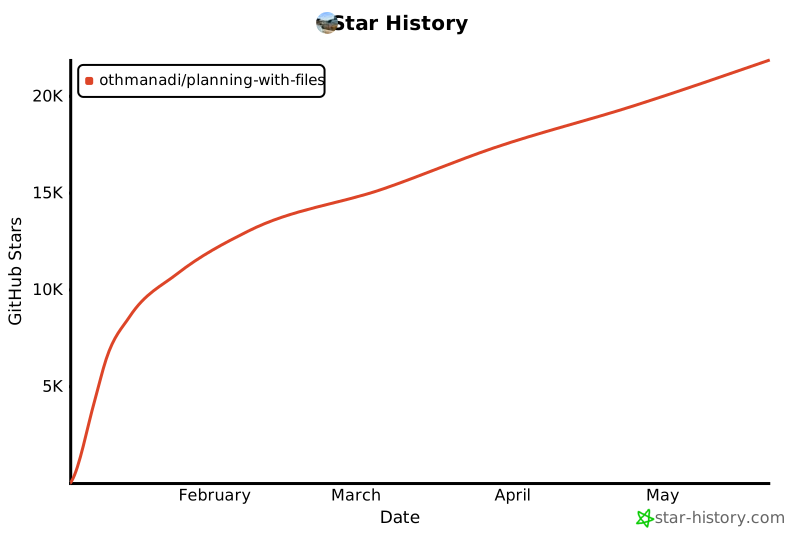
## Star History
[](https://star-history.com/#OthmanAdi/planning-with-files&Date)