What Is Claude Code and Who Is It For?
Claude Code is a terminal-based coding tool built by Anthropic. You run it from the command line, and it uses Claude's language models to help you write, review, explain, and fix code. Unlike a chat interface, it reads your actual project files, understands context across multiple files, and can execute shell commands on your behalf.
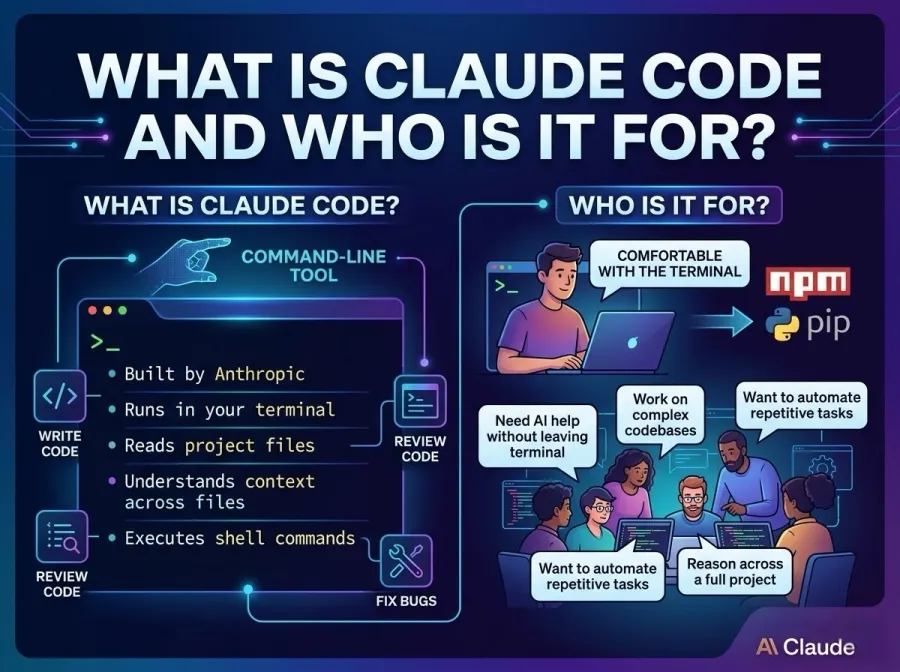
It is designed for people who already feel comfortable with a terminal. That said, the basics are not complicated. If you have ever installed a package with npm or pip, you already have enough experience to get started.
Claude Code is useful in several scenarios:
-
You want AI help without leaving your terminal or code editor
-
You are working on a complex codebase and need context-aware suggestions
-
You want to automate repetitive coding tasks like writing tests or refactoring functions
-
You need a model that can read documentation, compare files, and reason across a full project
How to Use Claude Code: Installation and First Setup
Step 1 — Install Node.js and the Claude Code Package
Claude Code requires Node.js version 18 or higher. If you are not sure which version you have, open a terminal and run:
node --version
If Node.js is not installed, download it from the official Node.js website. Once Node.js is ready, install Claude Code globally with:
npm install -g @anthropic-ai/claude-code
This adds the claude command to your system. You can verify it worked by running claude --version.
Step 2 — Set Your API Key
Claude Code connects to Anthropic's API, which means you need an API key. If you have an Anthropic account, you can generate one from the console. Once you have it, set it as an environment variable:
export ANTHROPIC_API_KEY=your_key_here
You can also add this line to your .bashrc or .zshrc file so it loads automatically every time you open a terminal.
Step 3 — Start Claude Code in Your Project
Navigate to your project folder and run:
claude
Claude Code will start an interactive session. It can now read your files and respond to your questions with full awareness of your project's structure.
How to Use Claude Code Effectively in Daily Development
Getting Claude Code installed is the easy part. Getting real value from it takes a bit of practice, but the learning curve is short.
Ask specific questions. Instead of "help me with this code," try "find all the places in this project where I'm making API calls without error handling and suggest fixes." Specific prompts produce specific results.
Let it read context first. You can tell Claude to read a particular file before asking questions: "Read auth.js, then explain what the login function does." This grounding step usually produces much better answers.
Use it for code review. Paste or point to a file and ask Claude to look for bugs, suggest performance improvements, or check for security issues. Many developers find this more useful than writing code from scratch, because it catches problems in existing work.
Automate boilerplate. Ask Claude to write unit tests for a function, generate a README based on your project files, or scaffold a new component following your existing patterns. These are tasks where Claude tends to perform reliably.
Here is a quick reference for common use cases:
TaskExample PromptDebug an error"I'm getting a TypeError on line 42. Here's the stack trace. What's wrong?"Write tests"Write Jest unit tests for the functions in utils.js"Explain code"Explain what this function does in plain language"Refactor code"Refactor this function to use async/await instead of callbacks"Generate docs"Write JSDoc comments for every exported function in this file"
Understanding Claude Code API Costs and Model Options
Every request you make through Claude Code consumes API tokens. Tokens are essentially units of text — roughly three to four characters each. A short conversation might use a few hundred tokens; analyzing a large file might use tens of thousands.
Anthropic charges per million tokens, and the cost varies depending on which Claude model you use. Claude Sonnet models are significantly cheaper than Claude Opus models while still being highly capable for most coding tasks. This makes model selection an important decision for anyone planning to use Claude Code heavily.
This is where the broader ecosystem matters. Rather than going directly through Anthropic's API, many developers route their Claude Code requests through a unified API provider. That approach can reduce costs, improve reliability, and give you access to multiple models through a single integration point.
Using GPT Proto to Power Claude Code at Lower Cost
When a major AI platform changes its pricing, adjusts rate limits, or introduces new access restrictions, the ripple effects hit developers immediately. Projects break, budgets shift, and teams scramble to adapt. One way to reduce that exposure is to route your AI requests through a provider that aggregates access across multiple sources.
GPT Proto is a unified API platform that connects developers to top AI models, including the full Claude model family, through a single consistent interface. Instead of managing a direct Anthropic API key alongside separate keys for other providers, you use one GPT Proto key for everything.
For Claude Code specifically, GPT Proto supports direct integration. You point Claude Code to the GPT Proto endpoint and use your GPT Proto API key instead of the native Anthropic key. The models work the same way, but you often access them at better rates due to GPT Proto's volume aggregation across enterprise compute capacity.
The Claude models available through GPT Proto include:
ModelUse CaseDiscount vs Market Rateclaude-sonnet-4-6Fast reasoning, coding, analysisUp to 30% offclaude-opus-4-6Complex tasks, deep reasoningUp to 30% offclaude-haiku-4-5High-volume, lightweight tasksUp to 30% off
You can browse all available Claude models on GPT Proto to compare pricing and capabilities before choosing which one to configure for your Claude Code workflow.
Beyond pricing, GPT Proto also provides automatic failover. If one underlying model source goes down, requests are rerouted to a working backup, which means your Claude Code sessions stay active even during provider outages. For teams with production workflows that depend on AI-assisted coding, that reliability is worth a lot.
There is no annual contract required. GPT Proto operates on a pay-as-you-go model with transparent pricing, which makes it practical for solo developers and enterprise teams alike. You can explore available models and pricing here.
FAQs About How to Use Claude Code
Can Claude Code edit files directly?
Yes. If you ask it to make changes, it will show you a diff and ask for confirmation before writing to disk. You stay in control of every edit.
Does it work offline?
No. Claude Code sends requests to an API endpoint and requires an internet connection.
Can I use it with any programming language?
Yes. Claude Code works with any language that Claude's models understand, which in practice means nearly every mainstream language and many niche ones.
How do I switch models?
You can specify a model when starting a session or configure a default model in your settings. When routing through GPT Proto, you choose from the full Claude model catalog available on the platform.
Is my code sent to the API?
Yes, file contents and context are included in API requests. If you are working with sensitive code, review your provider's data handling policies. GPT Proto gives you explicit control over which underlying providers can access your data, which is an important consideration for regulated environments.
Conclusion
Learning how to use Claude Code is less about memorizing commands and more about developing a good working relationship with an AI assistant. Start with clear, specific prompts. Give it context. Use it for the tasks where AI assistance reliably saves time, like test generation, documentation, and debugging. Build gradually from there.
On the infrastructure side, routing your Claude Code requests through a platform like GPT Proto AI API adds a layer of cost efficiency and reliability that becomes increasingly valuable as your usage grows. With access to the latest Claude models at discounted rates, zero downtime guarantees, and a single API key that works across providers, GPT Proto removes the operational friction so you can focus on building.
Claude Code is one of the most practical AI developer tools available right now. With the right setup, it fits naturally into any development workflow and pays for itself quickly in time saved.